# CyanCamera: Turning an iPhone Into a Broadcast Camera
Published 2026-09-21 by Daniil Popov. Source: https://mrpopov.com/posts/cyancamera-turning-phone-into-broadcast-camera/
This year I gave a 20 minute talk at [RTCON by Software Mansion](https://rtcon.swmansion.com/) about the color science behind CyanCamera. It's the app we built at [CyanView](https://www.cyanview.com/) so an iPhone can stand next to a Sony Venice or an ARRI Alexa in a live broadcast truck. Here is the talk, written down and a bit shorter.
Let me be honest first. I'm a backend guy, mostly Elixir, zero-downtime migrations and that kind of stuff. Color science was never my thing. But you can't ship a camera app if you don't know what a camera does with light, so I had to learn it. These are the parts that actually mattered when we built the app.
## Which red?
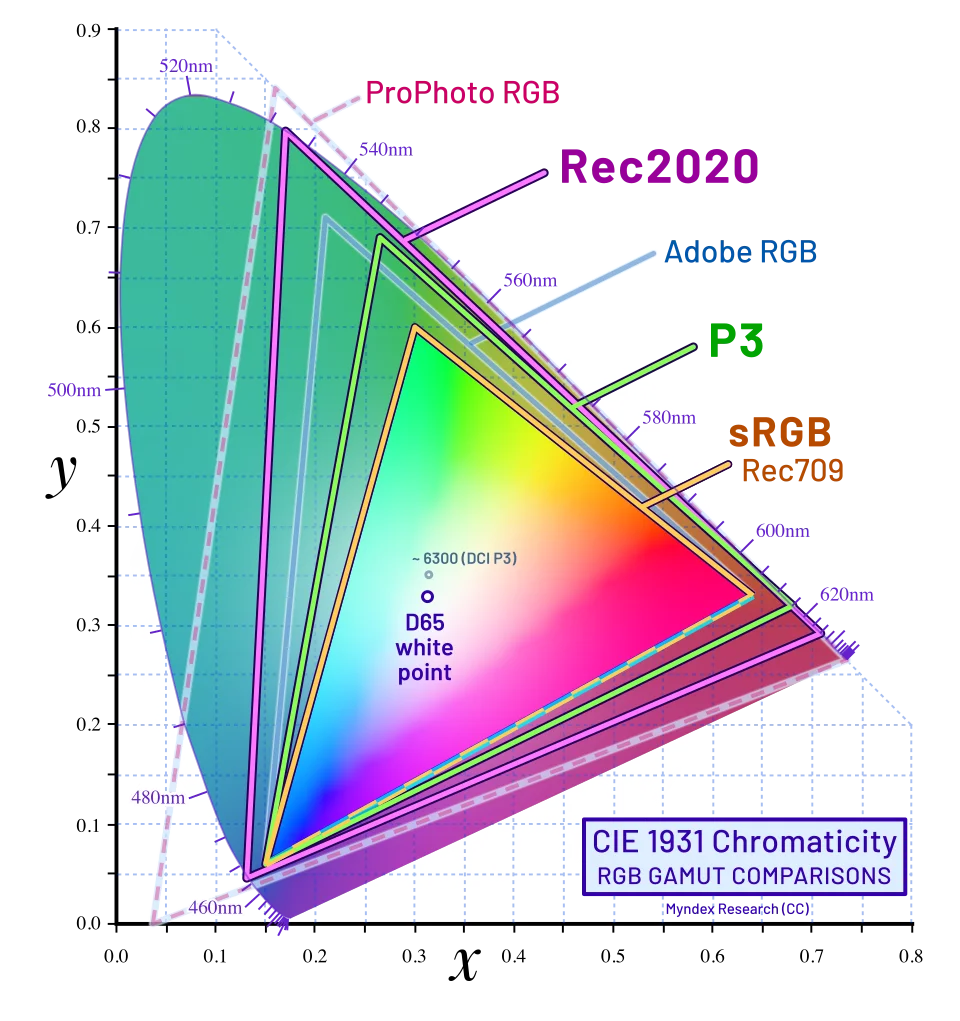
A camera sensor gives you RGB. Broadcast almost never sends RGB, it sends YCbCr: Y is brightness, Cb and Cr are color. To get Y you mix R, G and B with fixed weights. The catch is that HD and HDR use different weights:
| | Red weight | Green weight | Blue weight |
| :------ | :--------- | :----------- | :---------- |
| BT.709 | 0.2126 | 0.7152 | 0.0722 |
| BT.2020 | 0.2627 | 0.6780 | 0.0593 |
If you tag a stream BT.709 but encode it with the BT.2020 matrix, skin tones and whites come out wrong. Nothing downstream will tell you why. So CyanCamera picks the matrix from the active color space and tags the stream with it: BT.2020 for HLG and Apple Log, BT.709 for everything else.
Color is also stored at lower resolution than brightness, because your eye sees brightness much sharper than color. That's chroma subsampling, and 4:2:0 is what H.264, H.265 and most phone video do.
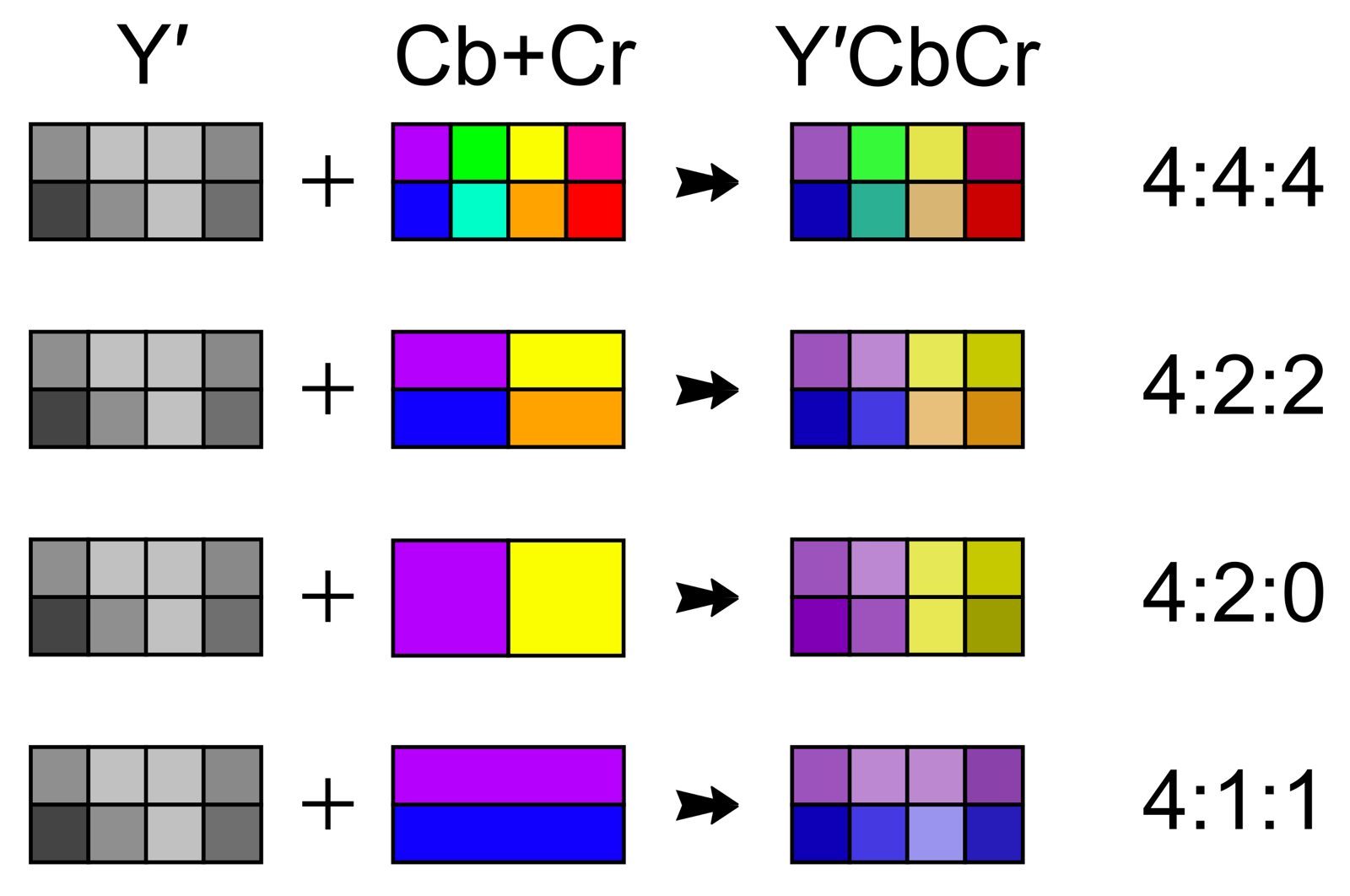
*4:4:4 keeps all chroma. 4:2:2 halves it horizontally. 4:2:0 halves both axes.*
## 8-bit vs 10-bit
8-bit is 256 steps per channel, 10-bit is 1024. On 8-bit, lift the shadows a bit and your sunset becomes pink stripes. 10-bit has 4 times more steps, so it stays smooth.
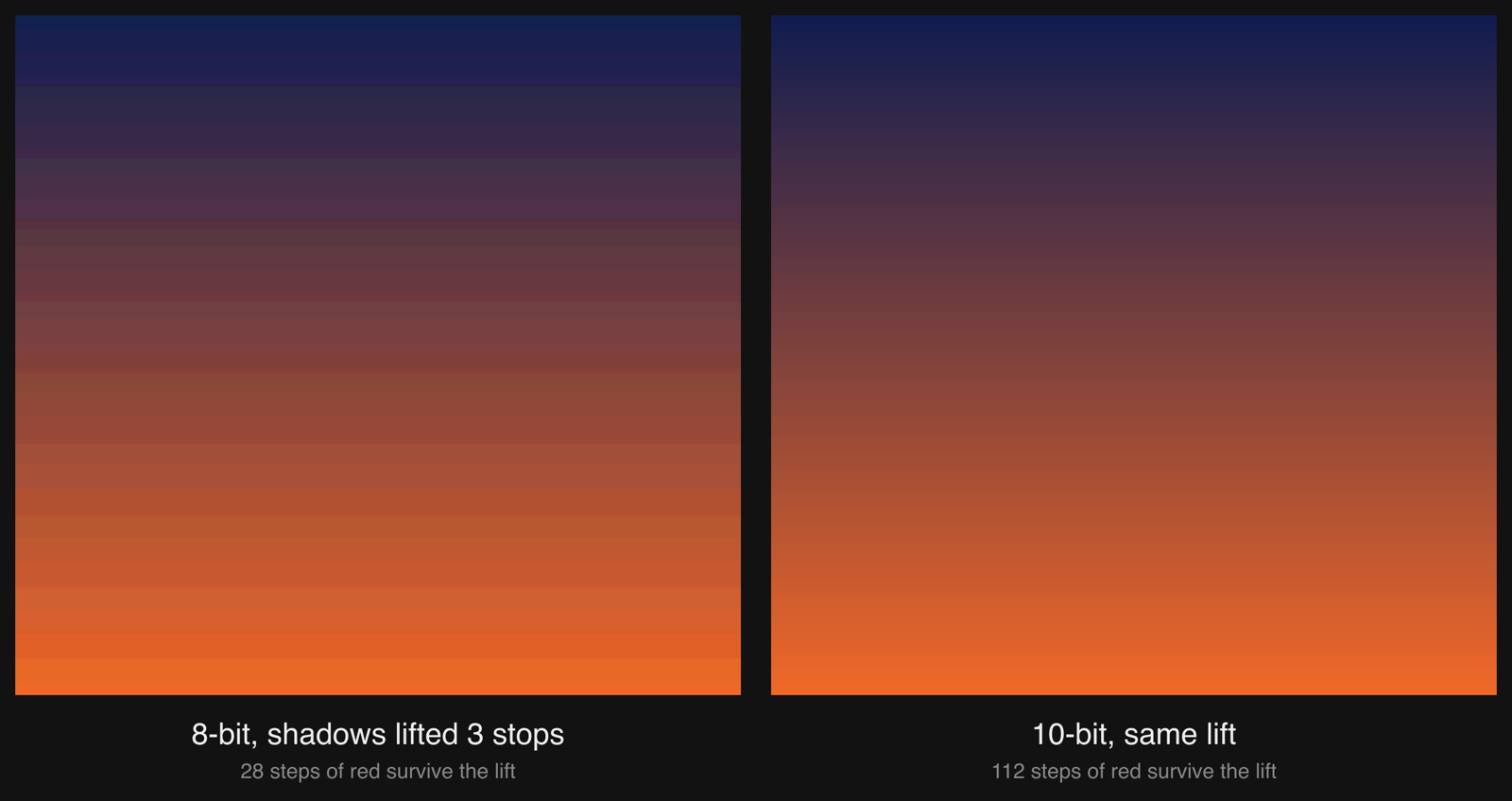
*The same dark sky at 8-bit and 10-bit, lifted 3 stops. 8-bit had 28 red levels to work with, 10-bit had 112.*
Most phone camera apps drop to 8-bit before anything touches the frame. We don't. Apple Log goes into half-float, the LUTs run on that, and only the final stream is quantized. 10-bit from sensor to encoder.
## 3D LUT in one minute
A 3D LUT is a grid. Every cell says "this RGB becomes that RGB". It moves all three channels together, so you can shift any color anywhere. Real LUTs keep 17, 33 or 65 points per axis and interpolate between them. 33³ is 35,937 entries, and that's enough for a full camera look.
Color space conversion, log decoding, matching camera A to camera B, the DP's look: you can bake all of it into one `.cube` file. On the GPU it's one texture lookup per pixel.
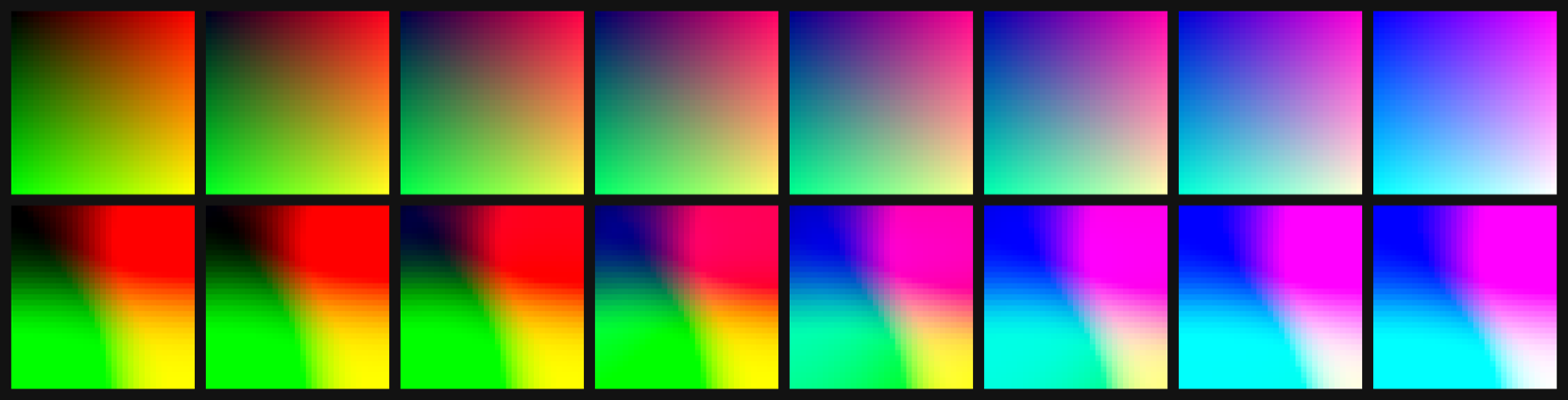
*Slices of a 33-point cube. Top: identity. Bottom: the Apple Log to Rec.709 cube CyanCamera ships.*
## Why log looks flat
A sensor sees about 14 stops of light, and 10 bits gives you 1024 values for them. Store light linearly and the top stop eats half of the values while the shadows get one or two. Store the log of the light and every stop gets roughly the same share, so all 14 fit.
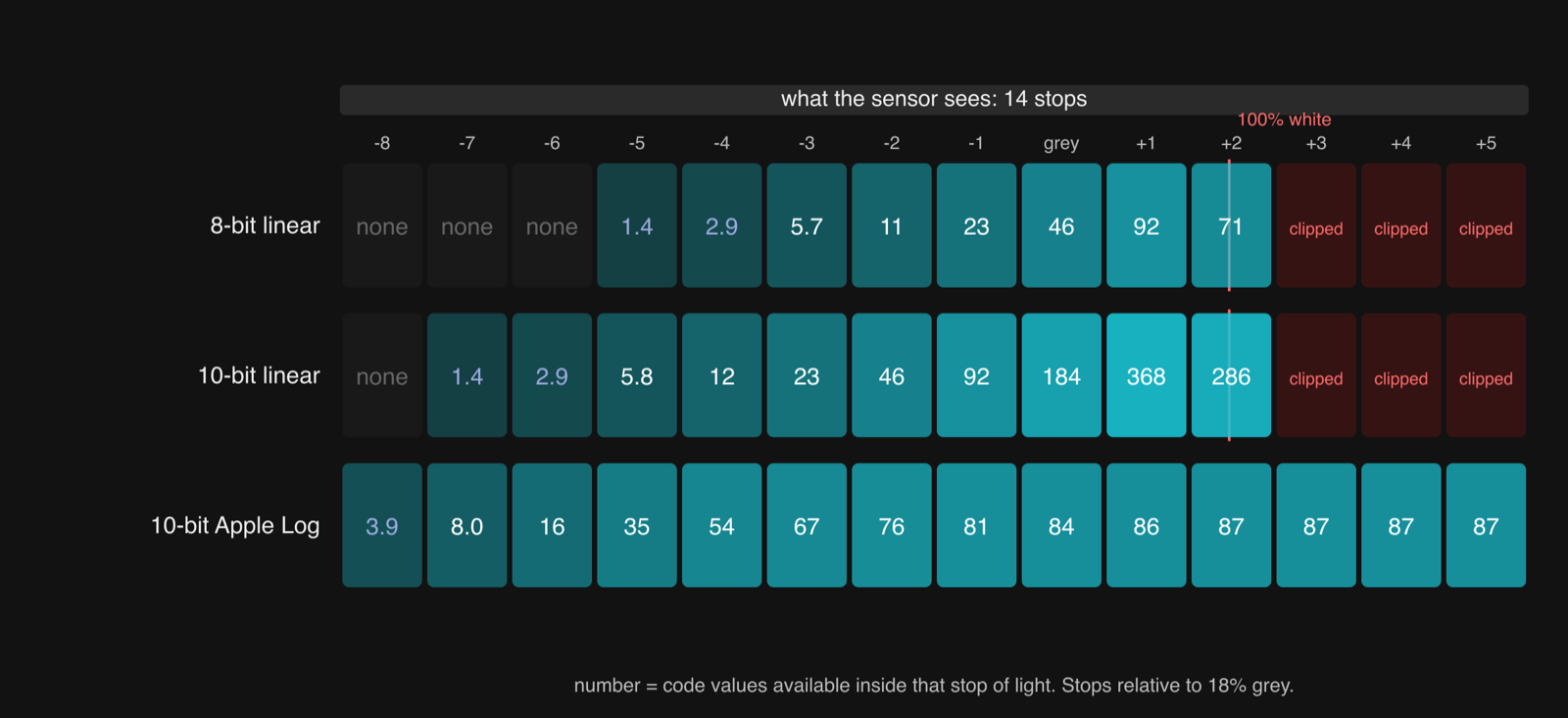
The price is a flat grey picture. Nobody watches log, you always convert it first.
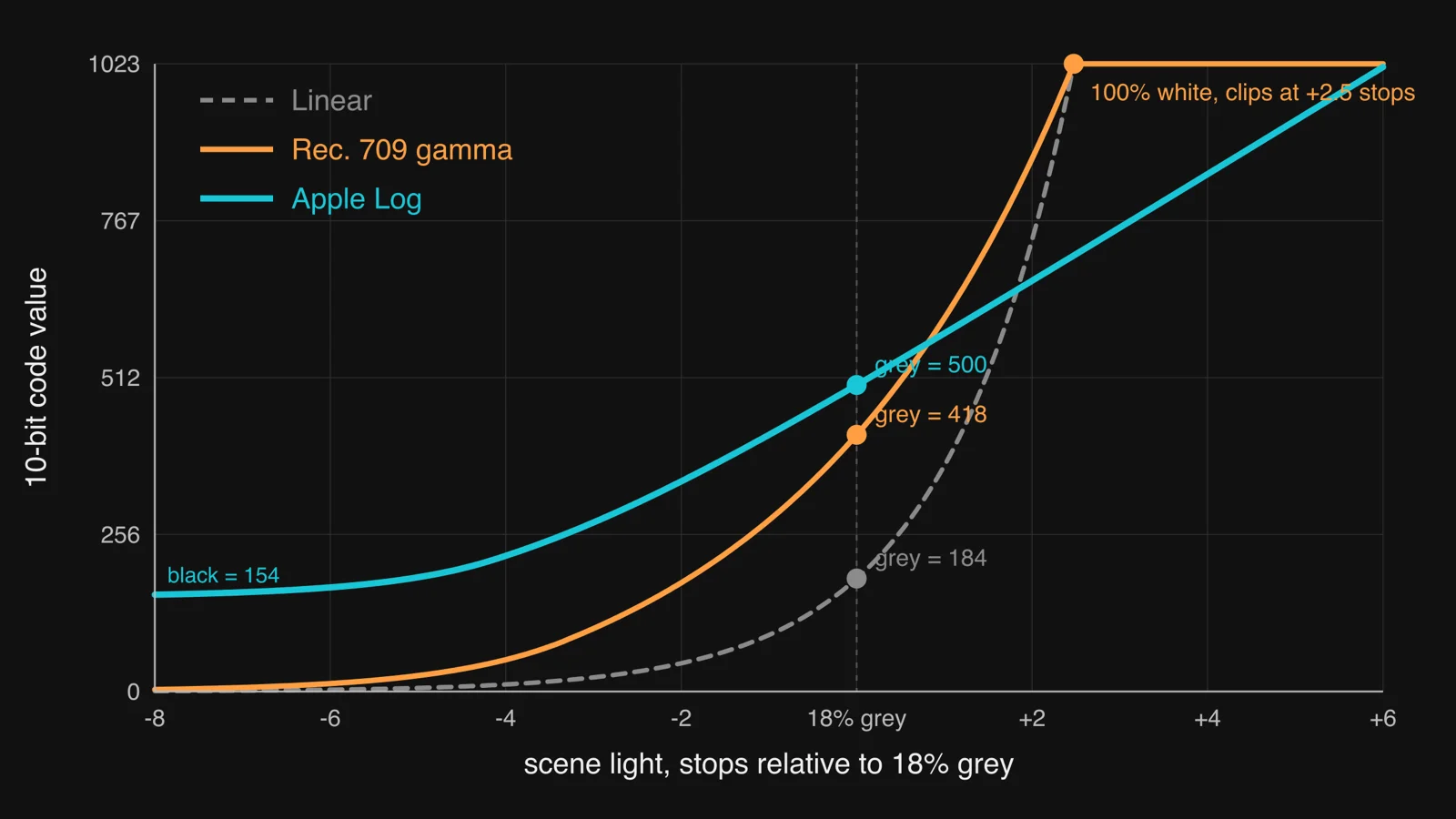
*Linear and Rec.709 clip 2.5 stops above grey. Apple Log keeps going to +6 stops and lifts black to code 154 so the noise below black survives.*
CyanCamera has three transfer functions on the device, both directions: Rec.709 (most trucks still deliver in it), Apple Log (iPhone 15 Pro and later) and HLG (HDR broadcast). Converting log back is again just a LUT, so "Apple Log to Rec.709" is one more `.cube` file.
## What happens per frame
A real broadcast camera shoots log and sends it to a color box. The box decodes log, applies the operator's grade, and sends Rec.709 or HLG to the vision mixer. Our plan was to put that whole chain inside the phone.
```
Sensor (≈14 stops)
│
▼
┌──────────────────────────────────────┐
│ Capture │
│ Apple Log / HLG / Rec.709 │
│ 10-bit YCbCr 4:2:0 BiPlanar │
│ (VideoRange) │
└──────────────────────────────────────┘
│
▼ (zero-copy CVPixelBuffer)
┌──────────────────────────────────────┐
│ CIContext → rgba16 half-float │ ← 10-bit precision preserved
└──────────────────────────────────────┘
│
▼
┌──────────────────────────────────────┐
│ Metal compute shader │
│ │
│ 1. GeneratedLUT (live RCP grade) │ ← runs in scene-linear
│ (Lift / Gamma / Gain etc.) │
│ │
│ 2. FileLUT (AppleLog→Rec.709 │
│ or HLG→Rec.709) │
│ │
│ combined = FileLUT(GeneratedLUT()) │
└──────────────────────────────────────┘
│
▼
┌──────────────────────────────────────┐
│ Output │
│ 10-bit YCbCr 4:2:0 │
│ + correct matrix (BT.709 / BT.2020) │
└──────────────────────────────────────┘
│
▼
HEVC → MPEG-TS → SRT / RTP / HDMI
```
Two LUTs, chained, for every pixel of every frame:
```
FileLUT : baked camera transform (Apple Log -> Rec.709)
GeneratedLUT : live color correction from the remote control panel
combined(color) = FileLUT( GeneratedLUT(color) )
```
Order matters here. Lift, gamma and gain look wrong if you apply them on log values. So the operator's grade from the panel runs first: we decode to linear, apply the correction, encode back, and bake it into a 17-point LUT on every change. Only then the file LUT converts to Rec.709. It's the same order a colorist uses in DaVinci Resolve, and the shader doesn't even know a control panel exists.
## So what?
Some shots never fit a Venice: crowd POV, a tiny rig in a corner. Before, you skipped the shot or rented other gear. Now it can be a phone in a small housing, with 10-bit Apple Log and the same control panel as the main camera next to it.
If the vision mixer cuts to it and nobody notices it was a phone, we did our job.
Questions and comments are welcome below.
- [CyanView](https://www.cyanview.com/)
- [1703 Group | Elixir Agency](https://1703.lu/)
- [Broadcast Grade Color Scopes in Phoenix LiveView](/posts/phoenix-liveview-webgl-color-scopes/)