CyanCamera: Turning an iPhone Into a Broadcast Camera
I gave a 20-minute talk this year at RTCON by Software Mansion on the color science behind CyanCamera, the app we built at CyanView that lets an iPhone sit next to a Sony Venice or an ARRI Alexa in a live broadcast truck. This post is that talk, written down.
I own the software side of CyanView: the dashboard that talks to every camera in the truck, the web studio with broadcast-grade scopes (I wrote about building those in LiveView a while back), and CyanCamera. Before CyanView it was zero-downtime migrations and systems serving millions of users, mostly in Elixir. Color science was not in the job description. It became one anyway, because you cannot ship a camera app without understanding what a camera actually does to light.
So, in order: what color is, how it gets stored, why 3D LUTs are the one tool that makes any of this tractable, why log exists, and finally how CyanCamera chains all of it into a shader that runs once per frame on your phone.
Color is light, filtered by three receptors
Light is a wave. Wavelength is what we call color: roughly 450nm reads as blue, 530nm as green, 620nm as red. Your eye has three types of cone cell, S, M and L, tuned to roughly those three bands. Every color you have ever seen is your brain reconstructing a scene from three numbers.
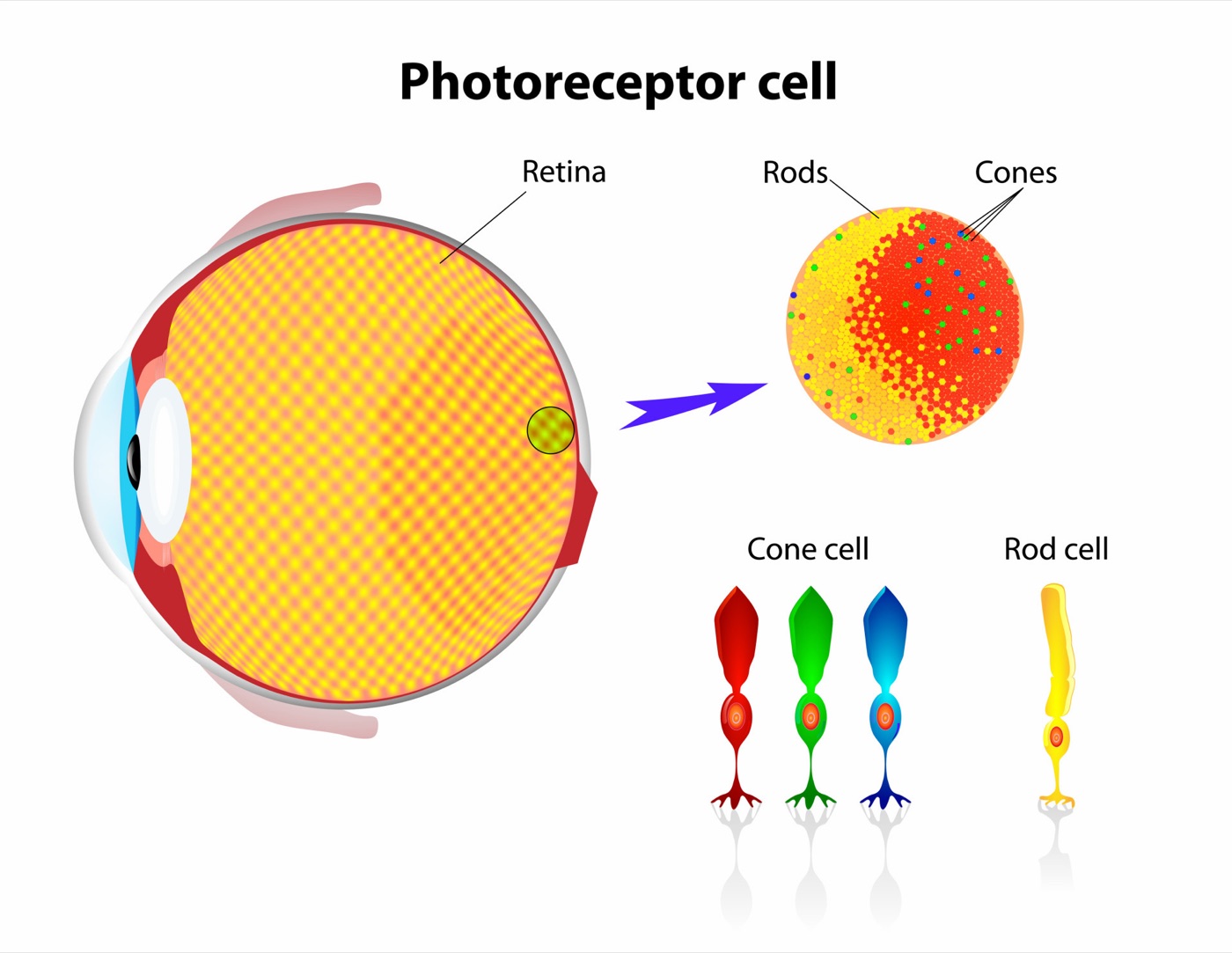
Three receptors in the eye. Three color filters on a camera sensor. Three primaries in every display you own. That is not a coincidence, it is the entire reason RGB exists as a format. A camera sensor mimics your eye with red, green and blue filters over its pixels. For every pixel: three measurements, photons in, numbers out. From here, color is just math, and the rest of this post is what we do with those three numbers.
RGB vs YCbCr, and why bits matter
RGB is what your screen emits and what every LUT and shader operates on. But almost nothing in broadcast ships as RGB. It ships as YCbCr: Y is luma (brightness), Cb and Cr are color difference. The luma formula for HDTV, BT.709, is:
Y’ = 0.2126 R’ + 0.7152 G’ + 0.0722 B’
The reason this split exists: your eye resolves brightness far more sharply than it resolves color. YCbCr exploits that on purpose. Split brightness from color and you can store the color channels at lower resolution with almost no visible loss. This is not a compression artifact bolted on after the fact, it is a deliberate design built on how human vision actually works.

That lower resolution for color has a name: chroma subsampling. 4:2:0 means full-resolution luma and quarter-resolution chroma, and it is what H.264, H.265 and ProRes 422 all do under the hood.
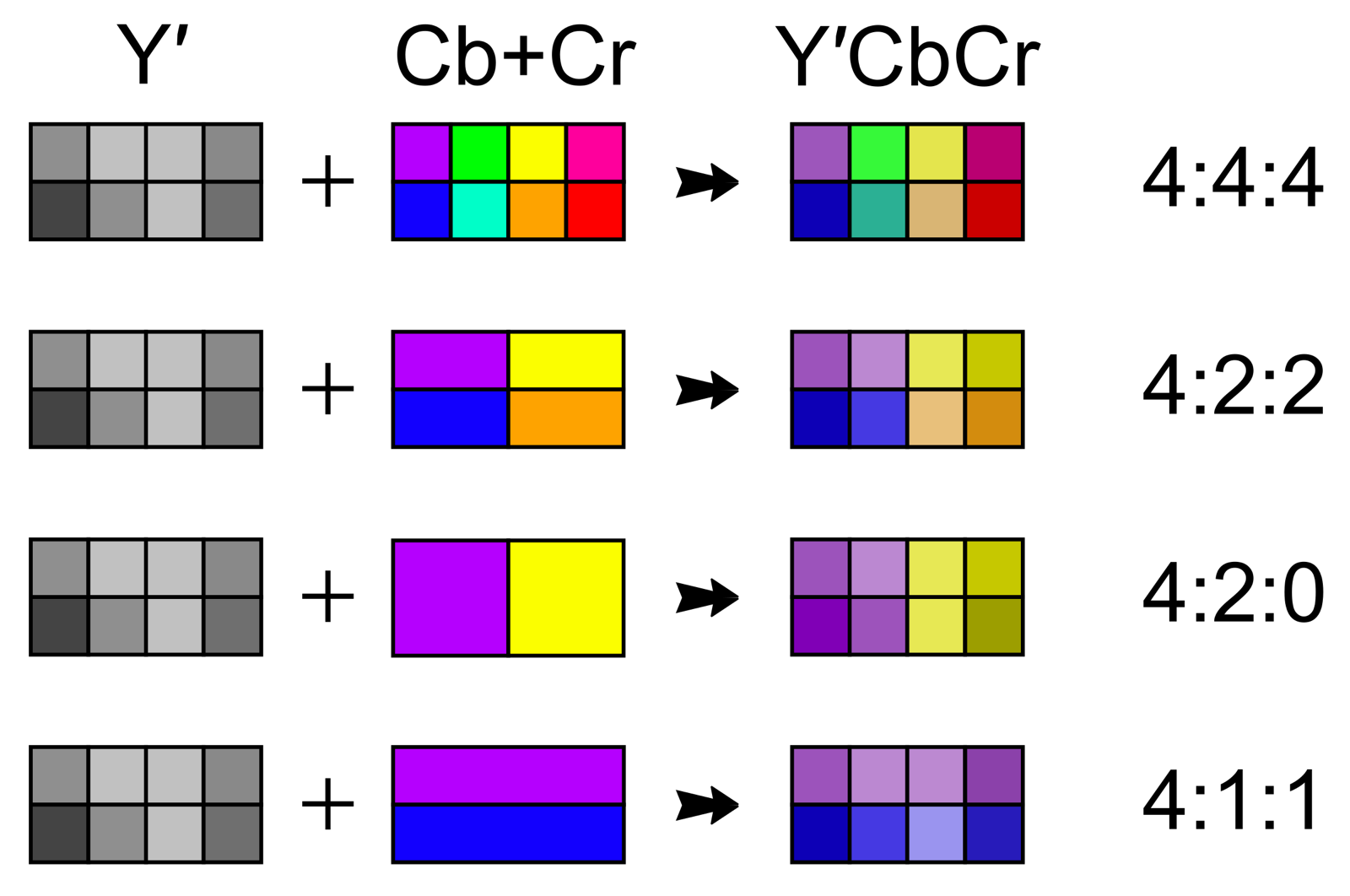 4:4:4 keeps all chroma. 4:2:2 halves it horizontally. 4:2:0 halves both axes.
The compromise: you cannot grade aggressively on 4:2:0 8-bit without chroma artifacts showing up. You can on 4:2:0 10-bit, because the extra precision per sample hides the subsampling.
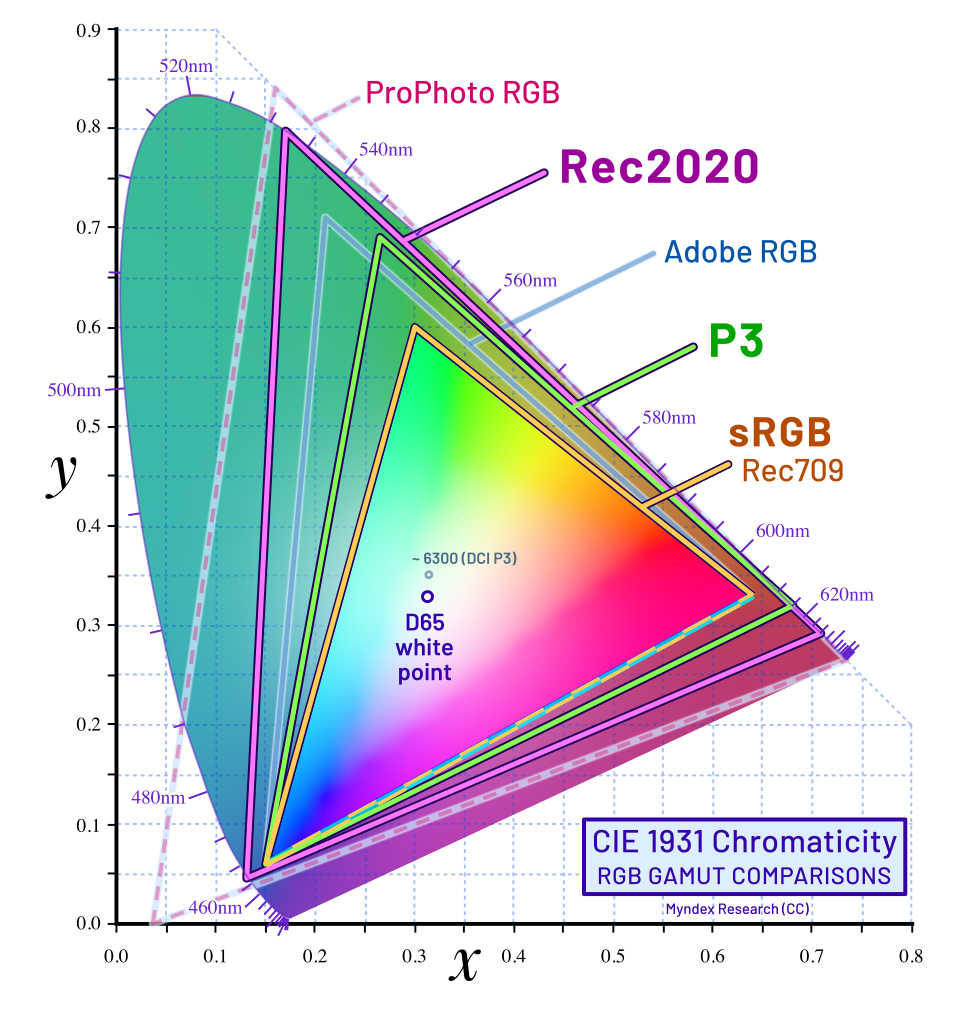
There is a second, less obvious catch: which red. BT.709 (HD, SDR) and BT.2020 (UHD, HDR, and the primaries Apple Log captures into) use the same YCbCr plumbing with different coefficients:
| Red weight | Green weight | Blue weight | |
|---|---|---|---|
| BT.709 | 0.2126 | 0.7152 | 0.0722 |
| BT.2020 | 0.2627 | 0.6780 | 0.0593 |
A stream tagged BT.709 but actually encoded with the BT.2020 matrix arrives with wrong skin tones and wrong whites, and nothing downstream will tell you why. CyanCamera picks the matrix from the active color space and tags the stream correctly: BT.2020 for HLG and Apple Log, BT.709 for everything else.
And then there is bit depth. 8-bit gives you 256 steps per channel, a delivery format. 10-bit gives you 1024, a working format. Push shadows up on 8-bit footage and you see the steps: a sunset turns into stripes of pink. 10-bit has four times the steps, so graded footage stays smooth. Every broadcast and cinema camera records 10-bit or higher, for exactly this reason.
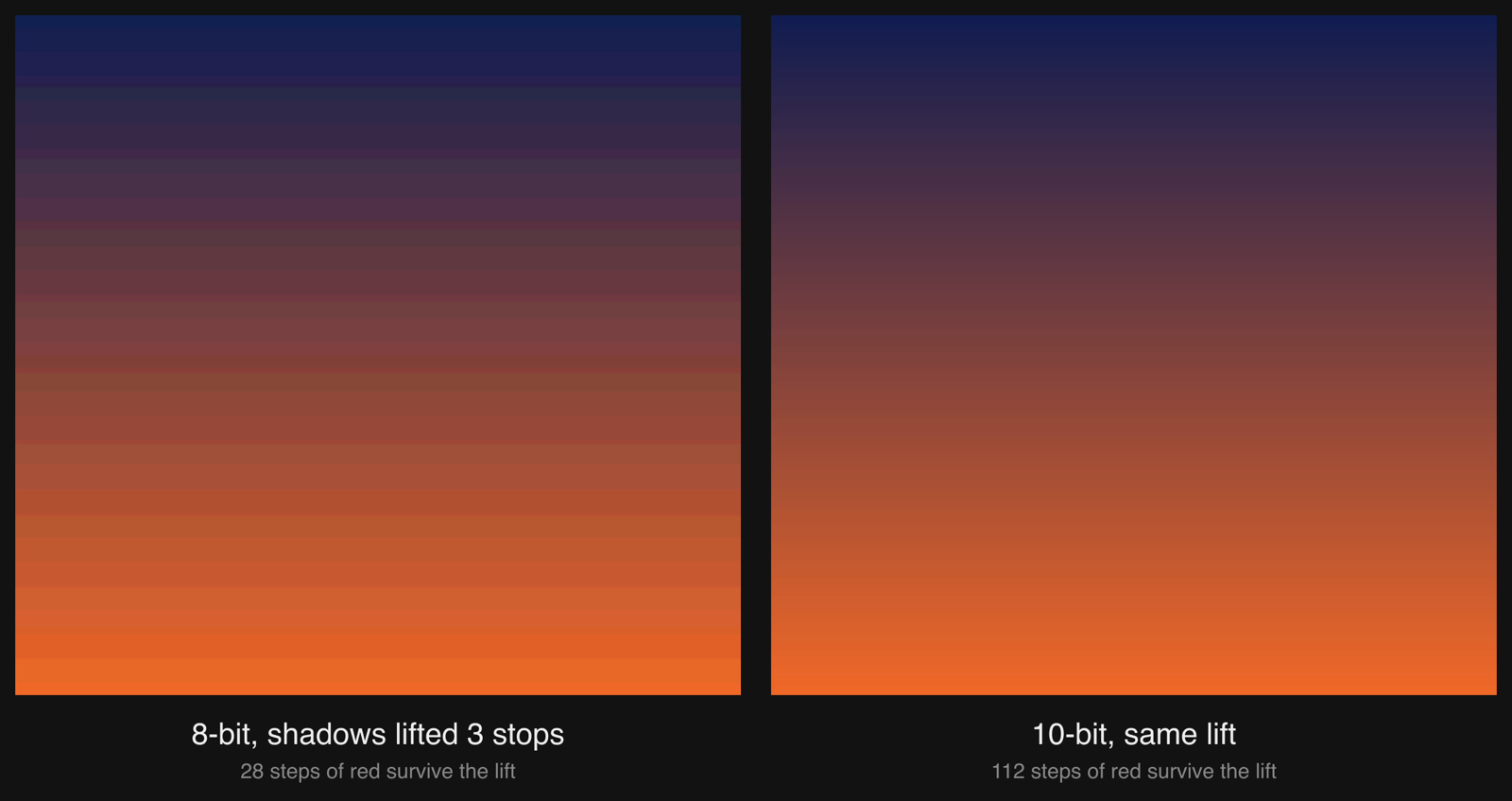 The same dark dusk sky, stored at 8-bit and at 10-bit, then lifted 3 stops the way a shader rescues an underexposed shot. 8-bit had 28 red levels to work with and every one becomes a visible stripe. 10-bit had 112 and stays smooth.
Most phone camera apps flatten straight to 8-bit before anything can touch the frame. CyanCamera does not: Apple Log decodes into half-float, the LUT runs on that, and only the final encoded stream gets quantized. 10-bit from sensor to encoder, no shortcuts in the middle.
3D LUTs: the universal color translator
This is the single most important tool in modern color work, and it is simpler than it sounds. A 3D LUT is a grid. Each cell says: this RGB triplet becomes that RGB triplet.
Input  (R=0.5, G=0.3, B=0.1)
Output (R=0.47, G=0.32, B=0.08)
A 1D curve can only bend one channel at a time, it cannot shift a hue. A 3D LUT indexes all three channels together, so any color can move anywhere. A full table covering every 10-bit RGB combination would need a billion entries, so real LUTs store 17, 33 or 65 points per axis and interpolate trilinearly between them. 33³ = 35,937 entries is enough for a complete camera look.

What makes a 3D LUT genuinely universal is that any color transform can be baked into one: color space conversion from Rec.2020 to Rec.709, log decoding from flat to graded, matching camera A to camera B, a DP’s creative look, or a broadcaster’s house style. Once baked, it is free to evaluate at runtime, one texture lookup per pixel, entirely GPU-parallel. The industry format is .cube, a plain text file that ARRI, Sony, Blackmagic and DaVinci all read without complaint.
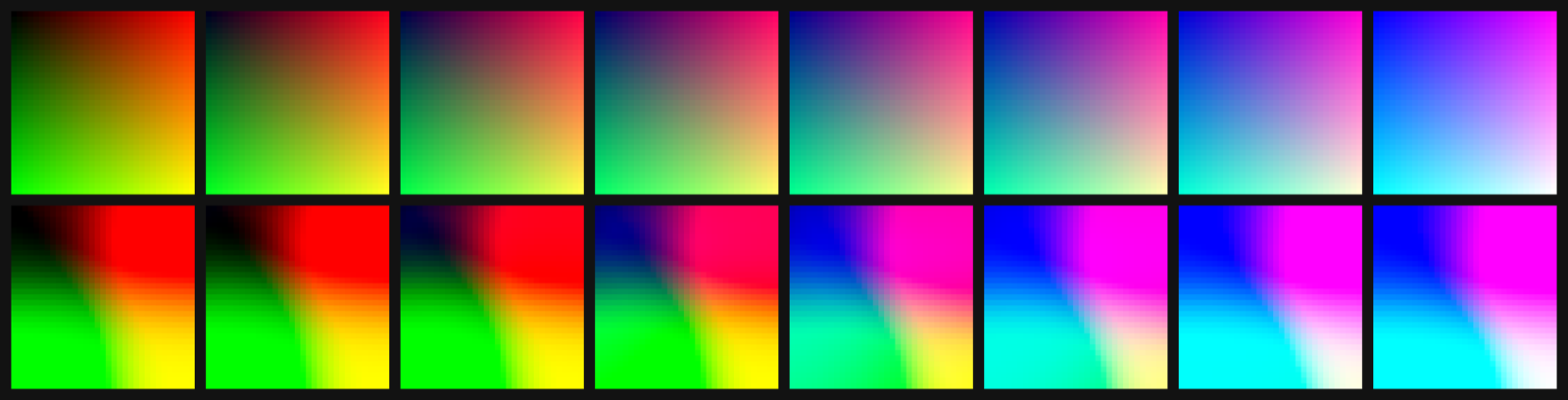 Eight slices of a 33-point cube, blue axis left to right. Top: identity, every color maps to itself. Bottom: the Apple Log to Rec.709 cube CyanCamera ships. Same input grid, flat log becomes graded Rec.709.
Gamma and log: spending your bits where the eye looks
A sensor captures roughly 14 stops of light. 10 bits gives you 1024 code values to spend across them. Store the sensor output linearly and you either clip the highlights or crush the shadows, the container is simply too small for the range. The fix is to store the logarithm of the light instead of the light itself.
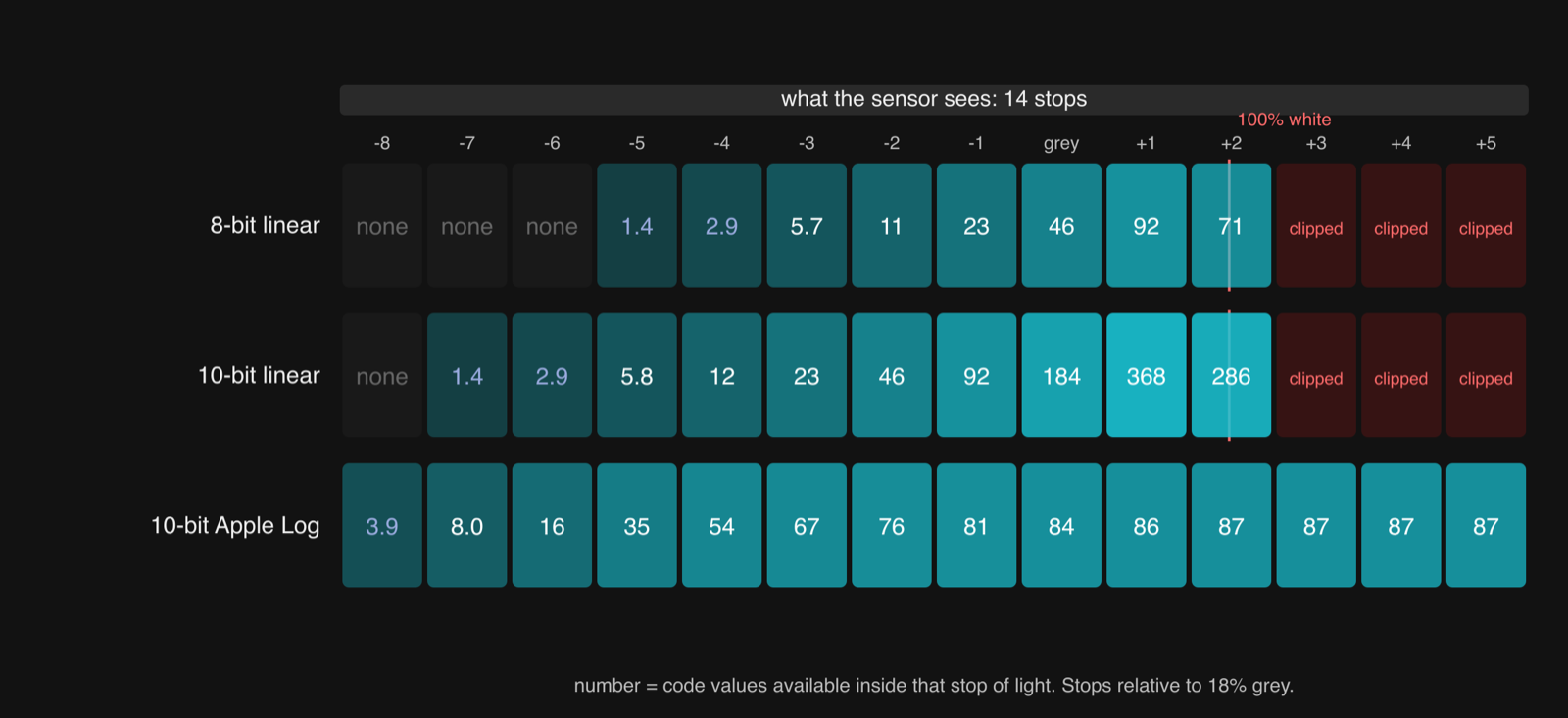 Code values available in each stop of light. Linear halves the budget with every stop down: the top stop gets hundreds, the shadows get one or two, and everything above white is gone. Log gives every stop roughly the same share, so all 14 fit.
Log spends code values where the eye actually looks, shadows and midtones, and gives fewer to highlights the eye barely distinguishes anyway. The same 10 bits now carry 14 stops of scene information. The price is that the picture looks flat straight out of camera. That flatness is not a look, it is a container waiting to be opened.
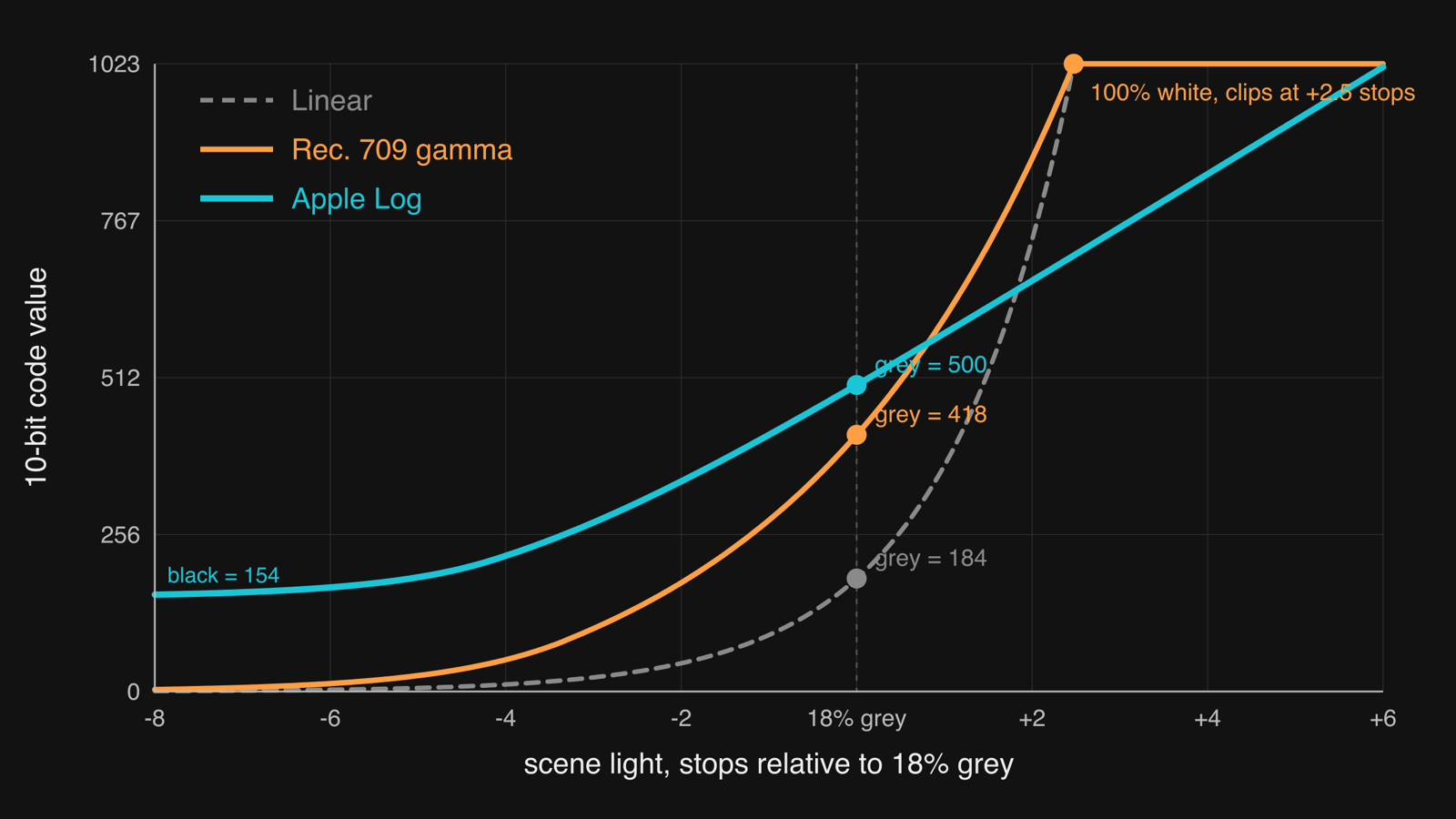 Three ways to encode 14 stops of scene light. Linear and Rec.709 gamma both hit code 1023 at 100% white, 2.5 stops above grey, and clip everything brighter. Apple Log, from the curve CyanCamera implements on-device, keeps going to +6 stops and lifts black to code 154 so sensor noise below black survives.
Which gives us the one rule that matters: you never watch log, you convert log. CyanCamera implements three transfer functions on-device, in both directions: Rec.709 (the SDR broadcast standard most trucks still cut and deliver in), Apple Log (iPhone 15 Pro and later, a piecewise log curve with about 14 stops), and HLG (the HDR broadcast standard used for things like the Olympics). Bringing log back into a display space is exactly what a 3D LUT does, so “Apple Log to Rec.709” is just another .cube file loaded at capture time.
The CyanCamera pipeline
A real broadcast camera never talks straight to the switcher. It shoots log, feeds a hardware color box, a CCU or an RCP-driven LUT box, that decodes the log, applies the operator’s grade, and hands clean Rec.709 (or HLG) downstream. Camera in log, color box, output: that three-stage chain is the entire professional pipeline, and every step in it exists because of one of the color science problems above, subsampling, the color matrix, bit depth, the log curve. Skip any one of them and the chain breaks somewhere a viewer can see.
CyanCamera’s job was to fit that exact chain inside the phone. No external CCU, no LUT box, no round trip to a truck: camera in log, color box, output, all of it on-device, all of it preserving every step from log to output that the hardware chain would otherwise do for you. Here is where the pieces click together, what actually happens per frame:
Sensor (≈14 stops)
        │
        ▼
┌──────────────────────────────────────┐
│  Capture                             │
│  Apple Log / HLG / Rec.709           │
│  10-bit YCbCr 4:2:0 BiPlanar         │
│  (VideoRange)                        │
└──────────────────────────────────────┘
        │
        ▼  (zero-copy CVPixelBuffer)
┌──────────────────────────────────────┐
│  CIContext → rgba16 half-float       │  ← 10-bit precision preserved
└──────────────────────────────────────┘
        │
        ▼
┌──────────────────────────────────────┐
│  Metal compute shader                │
│                                      │
│  1. GeneratedLUT  (live RCP grade)   │  ← runs in scene-linear
│     (Lift / Gamma / Gain etc.)       │
│                                      │
│  2. FileLUT       (AppleLog→Rec.709  │
│                    or HLG→Rec.709)   │
│                                      │
│  combined = FileLUT(GeneratedLUT())  │
└──────────────────────────────────────┘
        │
        ▼
┌──────────────────────────────────────┐
│  Output                              │
│  10-bit YCbCr 4:2:0                  │
│  + correct matrix (BT.709 / BT.2020) │
└──────────────────────────────────────┘
        │
        ▼
HEVC → MPEG-TS → SRT / RTP / HDMI
Two LUTs, chained, both evaluated per pixel per frame:
FileLUT      : baked camera transform (Apple Log -> Rec.709)
GeneratedLUT : live color correction from the remote control panel
combined(color) = FileLUT( GeneratedLUT(color) )
The order matters. The RCP grade runs before the log conversion, in the camera’s native space, which is exactly the order a colorist works in on a real grading panel. Lift, gamma and gain do not behave correctly in encoded log space, so the generator decodes to scene-linear first (the Apple Log EOTF, the HLG inverse OETF, or sRGB, depending on input), applies the correction, then re-encodes. That is precisely how a node in DaVinci Resolve works. We do it on-device, on every parameter change, baked into a single 17-point LUT so the shader never has to know a control panel exists.
Why this matters
Shots that used to need a specialty camera, crowd POV, a portable rig squeezed somewhere a Venice cannot fit, used to mean either skipping the shot or renting different gear. Now they can be a phone in a small housing: 10-bit Apple Log, 14 stops, the same color fidelity and the same control surface as the A-cam sitting next to it.
One shader, one look, one workflow. The phone earns its place in the rundown, not as a novelty cutaway but as a camera the vision mixer can cut to without anyone noticing it was a phone.