The BEAM Is a Friendly Host: C, Rust, Svelte and WebGPU Next to Elixir
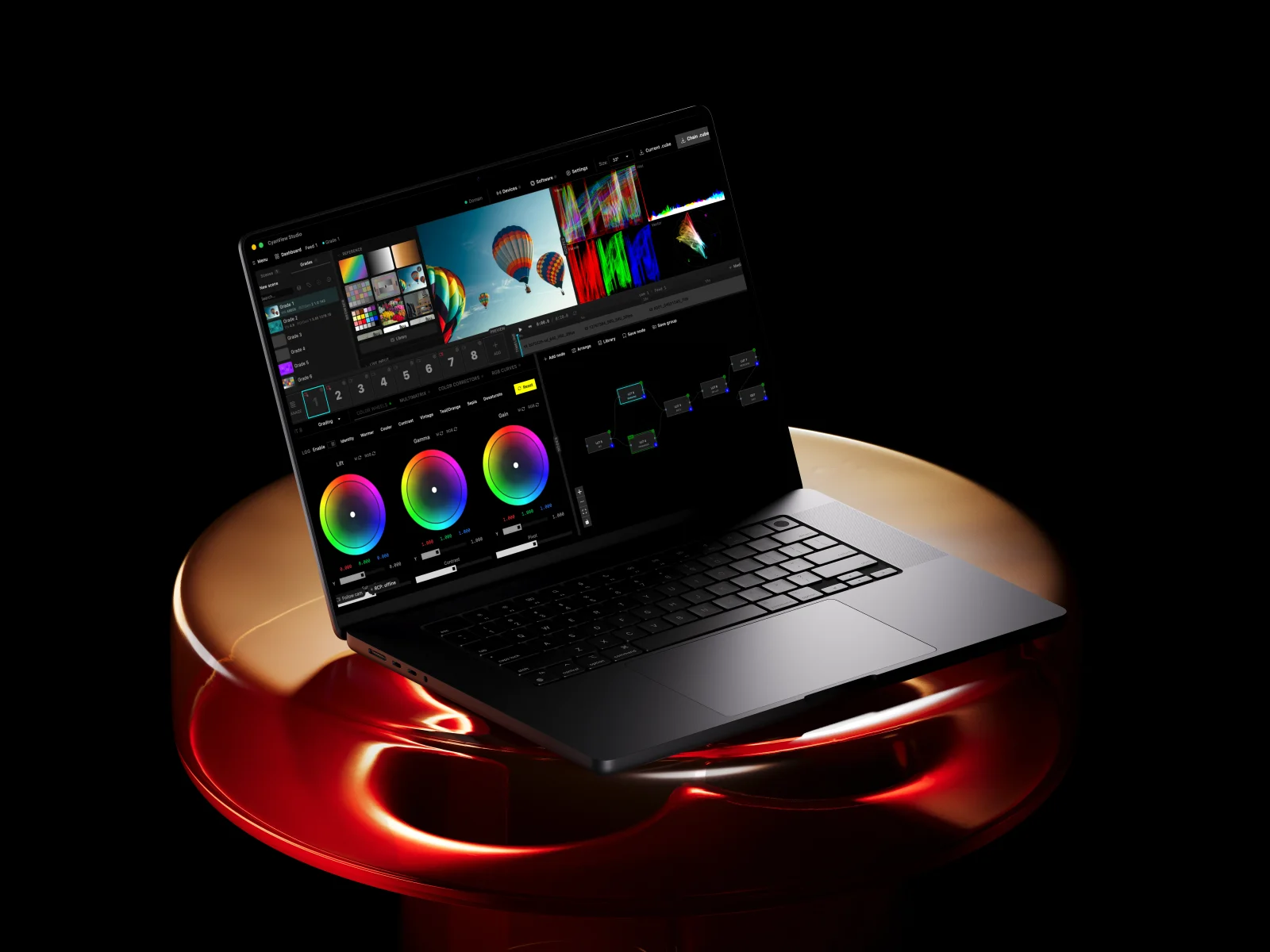
A few weeks ago I wrote down my talk on how one phone becomes a broadcast camera. This is the other end of that cable, from the second talk I gave this year, this time to an Elixir crowd at Goatmire.
This isn’t an Elixir pitch. It’s the story of how a small dashboard on a camera control panel turned into a color studio, and how each time the problem got harder we put another language next to Elixir instead of rewriting anything.
Elixir shows up in every part of it, but it’s rarely the interesting part, and honestly that’s what I like about it.
Quick context if you’re new here: I own the software side of CyanView: the dashboard that speaks to every camera in the truck, the web studio with broadcast-grade scopes, and the CyanCamera app. Before CyanView I spent years on zero-downtime migrations and systems with millions of users, a lot of it in Elixir.
Previously, on CyanCamera
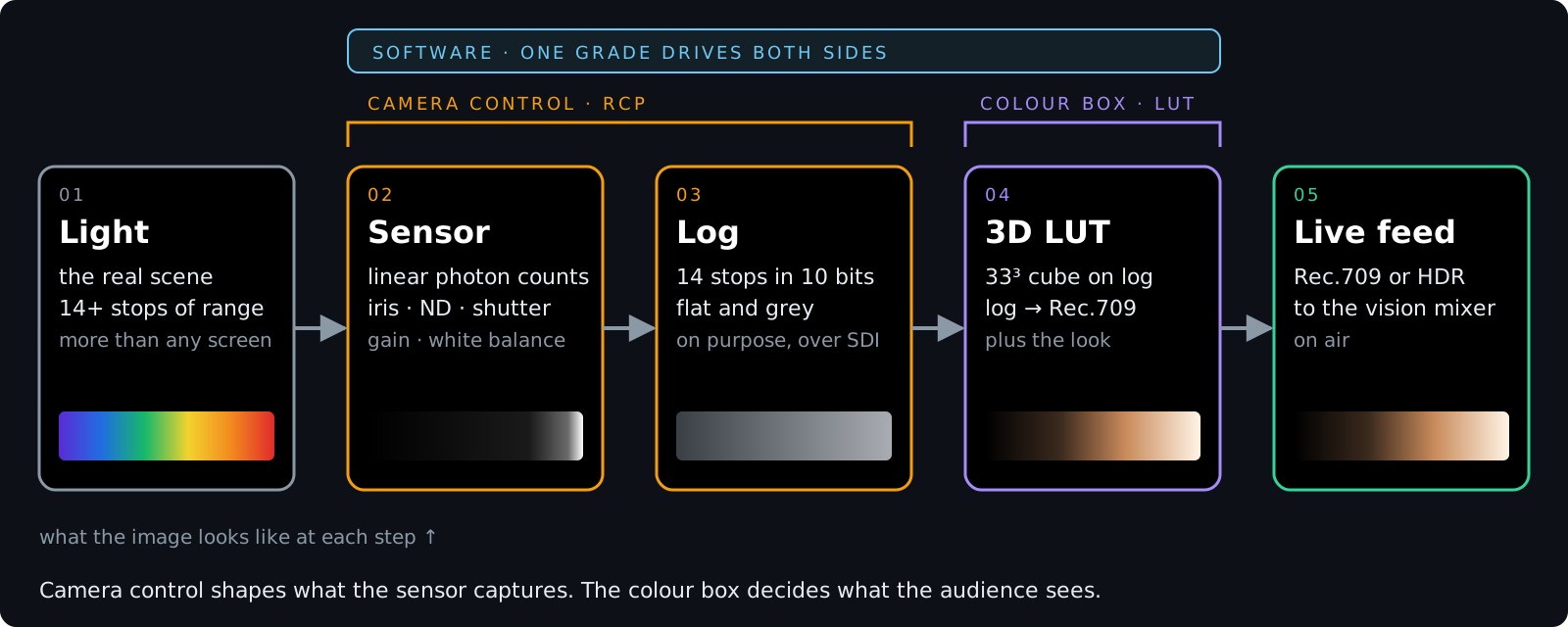
The phone post ended with a 33-point cube in a Metal compute shader, converting Apple Log to Rec.709 live. Here’s the same pipeline drawn for a whole truck.
Light hits the sensor, and camera control (iris, ND, shutter, gain, white balance) shapes what it captures. The camera doesn’t send a pretty picture. It sends log over SDI: fourteen stops squeezed into ten bits, flat and grey on purpose. Nobody watches log directly. A 3D LUT on a color box converts it, and the same LUT carries the look. After that it’s the vision mixer and then air.
On the phone there was one camera and the LUT ran on the device. This post is about who builds that LUT and how it gets to thirty boxes while the operator is still dragging the slider. The phone was Swift and Metal; this side is Elixir, with C, C++, Zig, Rust, Svelte and WebGPU around it.
For years the two brackets on that diagram were two tools, and often two people. The bar across the top, one grade driving both, is what we built.
Every broadcast is a zoo
Trucks, galleries and remote control rooms run gear from dozens of vendors who agree on basically nothing. We support 200+ camera models speaking 30+ control protocols. Video comes in over SDI, SRT, NDI or HDMI. Some cameras sit in the truck, some across the stadium, some on another continent. The look goes through color boxes: Flanders BoxIO, AJA ColorBox and FS-HDR, our VP4 and now the iVP. The newest animal isn’t a box at all, it’s color in software (DaVinci Resolve, OFX hosts, a virtual VP4), and that’s where this post ends up.
Operators don’t care about any of it. They want the panel to feel the same whatever camera is behind it, and hiding the zoo is the RCP’s whole job.
Act one: a dashboard on an ARM32
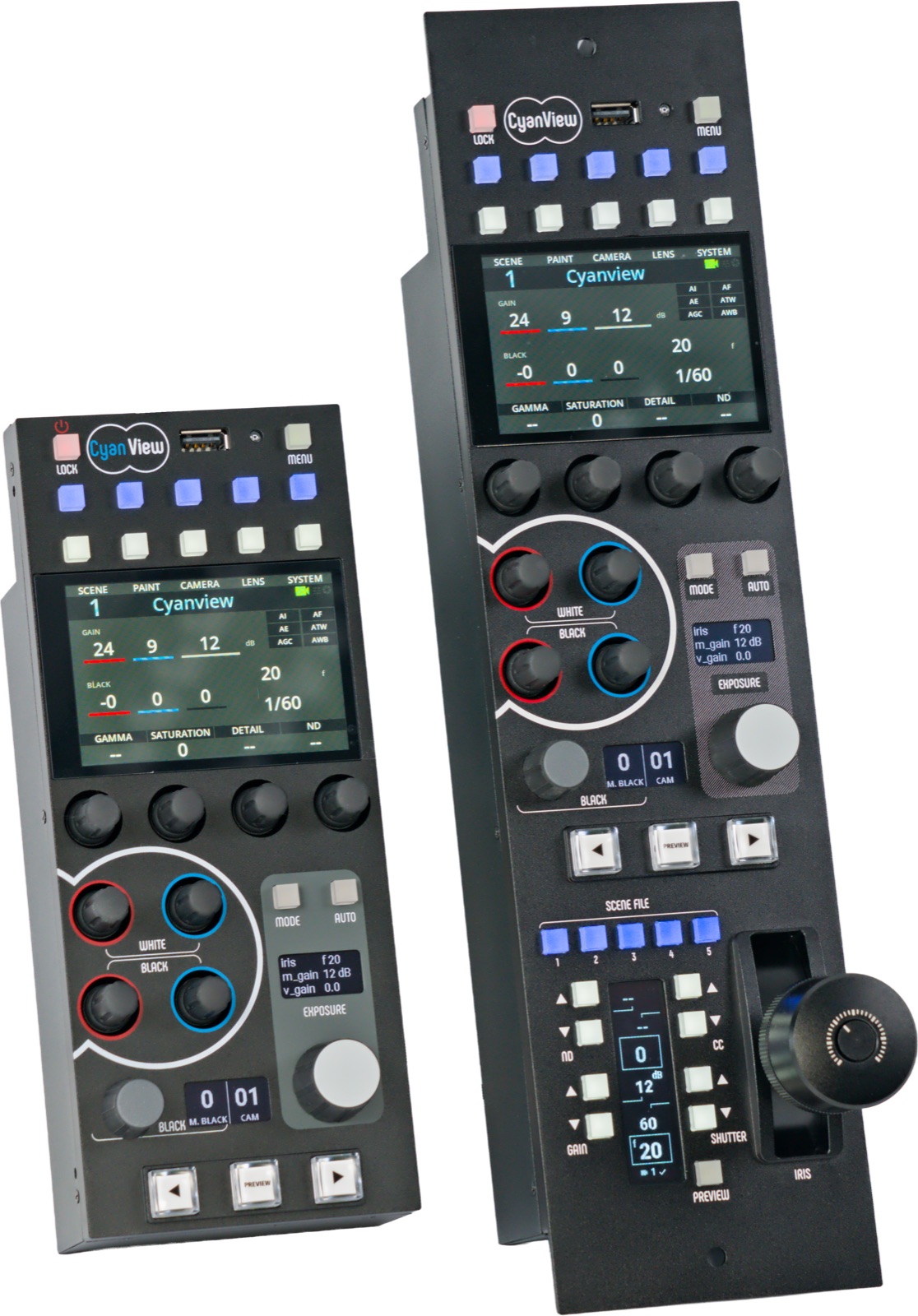
The RCP is a physical panel that drives many camera heads from different brands. Embedded people expected C. We picked Elixir on a small ARM board, because the panel can’t go down during a show.
+S 1:1        one scheduler
+P 50000      process limit
+MBas aobf    return memory to the OS fast
That’s all the VM tuning the panel needs (the long version is in the embedded memory post). Supervision trees and isolated processes did the rest.
The dashboard started small: values from every camera in one browser tab, served by the panel itself. Cameras talk faster than people read, so we keep the latest value per {camera, event} and flush every 250 ms.
@batch_interval 250

def handle_camera_event(socket, camera_id, event, value) do
  pending = Map.put(socket.assigns.pending_updates, {camera_id, event}, value)
  ...
end
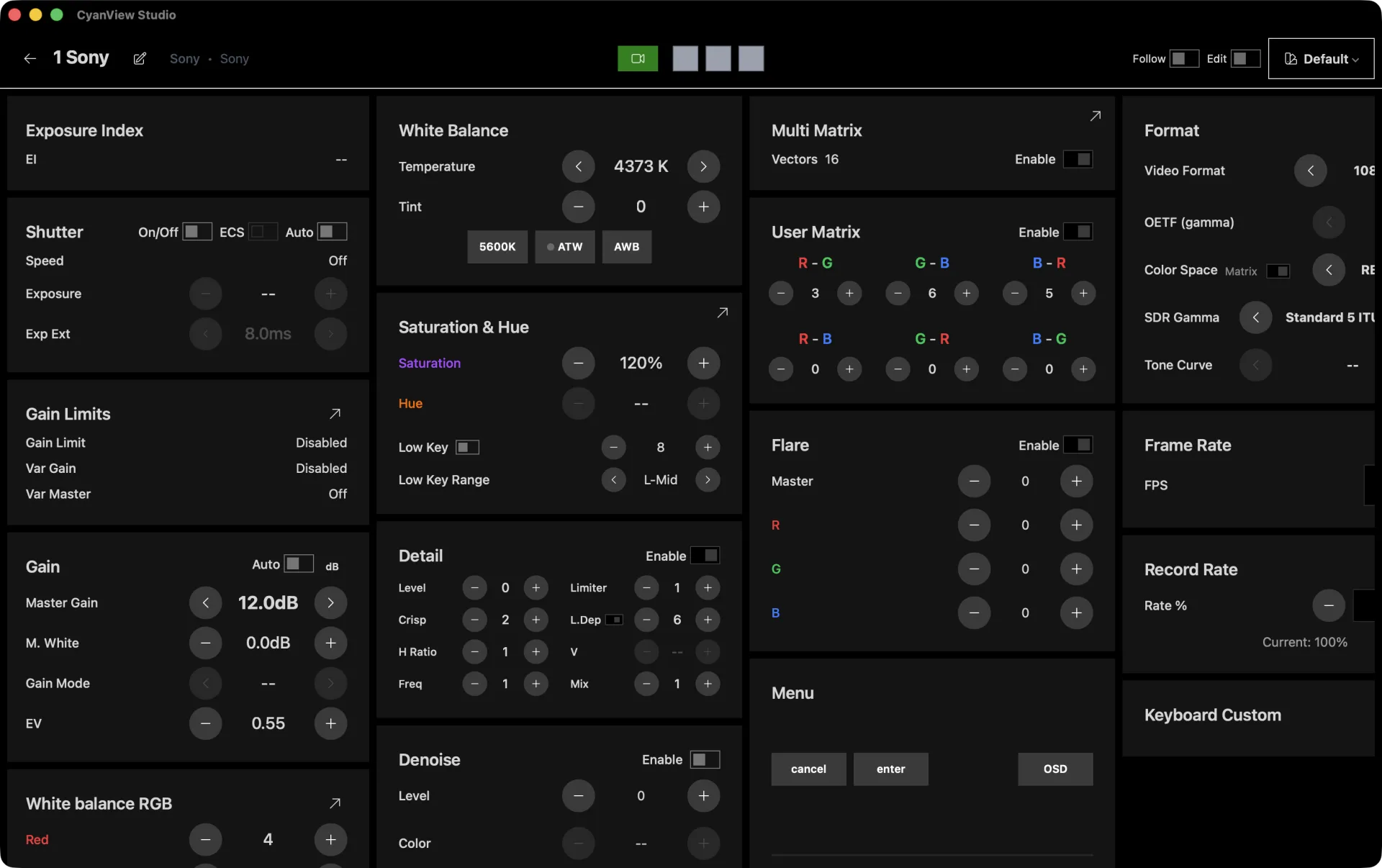
It’s plain LiveView on the panel’s own Phoenix endpoint. The server already has the state, so letting it render the UI was the obvious choice.
Then it grew. The panel has a fixed number of knobs and cameras have hundreds of functions, so everything that didn’t fit on the panel ended up in the dashboard:
| Beyond the panel | What it means | In the app |
|---|---|---|
| Custom camera functions | every function a camera has, not only the ones with a knob | 73 control components: PTZ, lens, user matrix, color warper … |
| New ways to control | touch, mouse, keyboard, any browser on the network | dashboard and control template editors, per show |
| Macros | one button, many cameras or groups at once | macro editor, macro pad, raw MQTT escape hatch |
| Automation | the rundown drives the cameras | OSC in, e.g. CuePilot: /macro /camera /grade /lut |
| Remote production | operators far from the truck | REMI sessions, one per scene |
At some point the dashboard stopped needing a person in front of it. Macros fire many cameras at once, and show automation like CuePilot sends OSC at the right moment in the rundown. It also left the truck: in remote productions the operator isn’t even in the same building as the cameras.
Act two: then color got serious
The iVP (our openGear successor to the VP4) and CyanCamera brought a lot more color science with them, and operators wanted camera values and looks in the same interface.
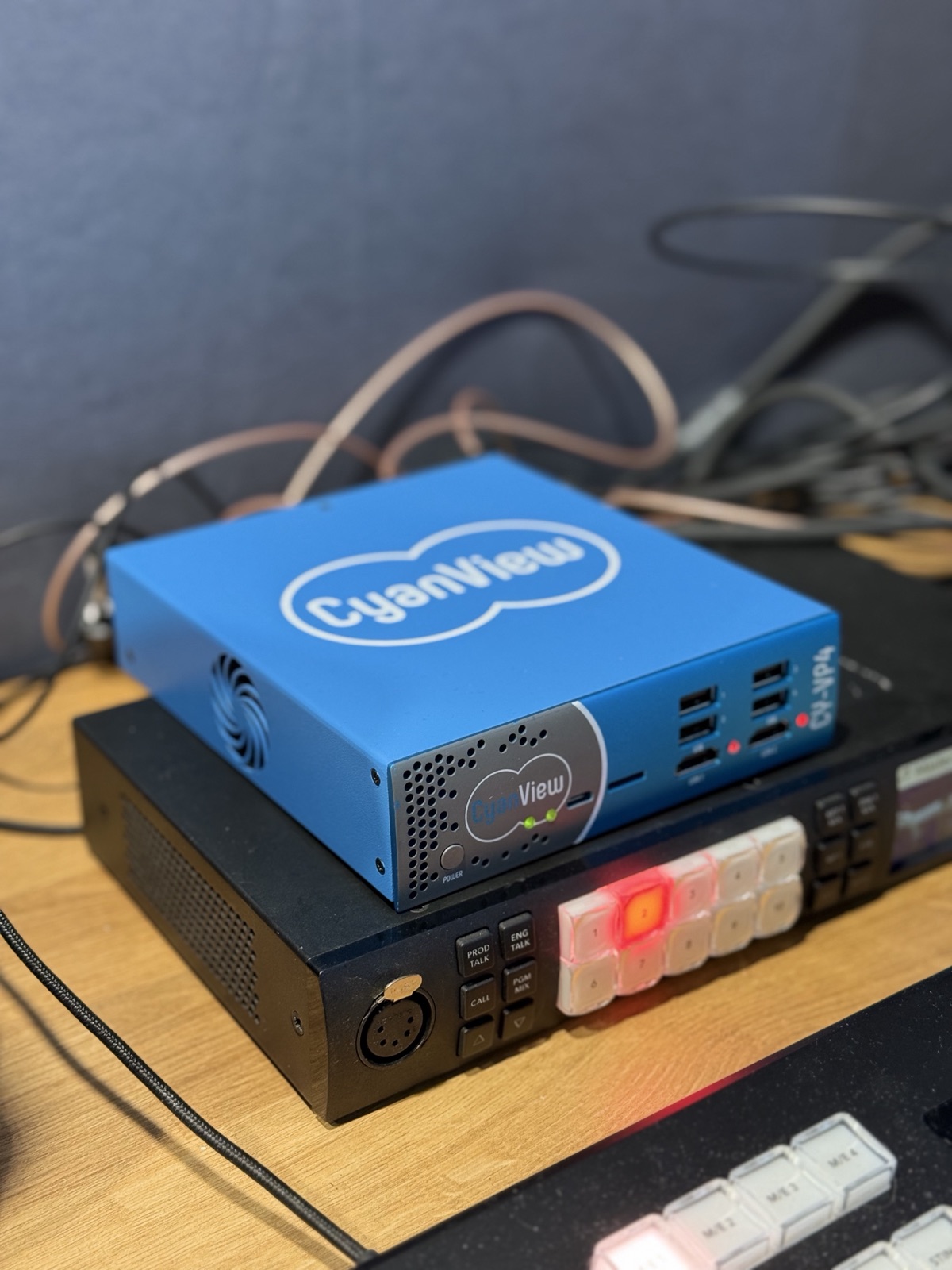 CyanView VP4
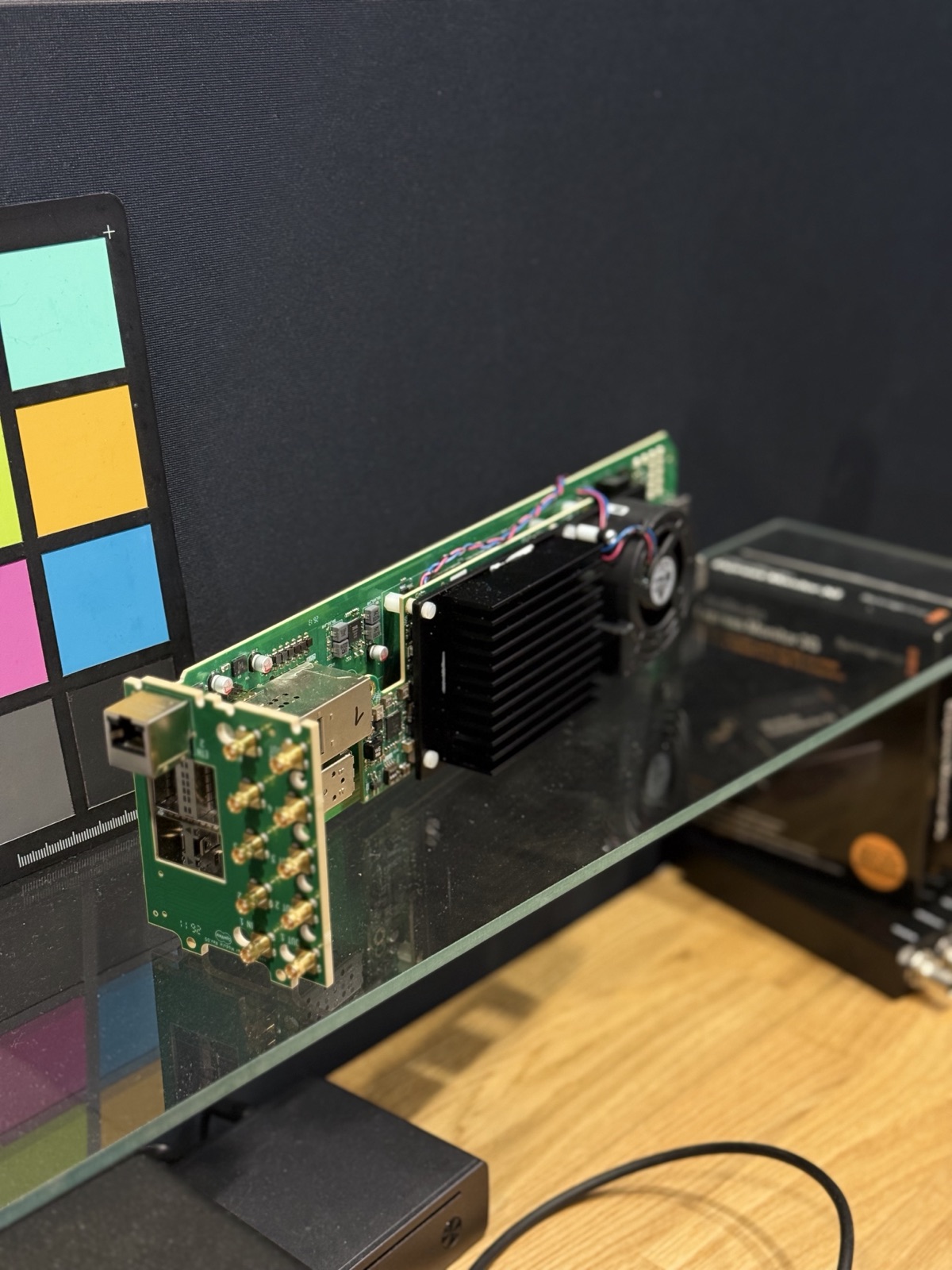 CyanView iVP, and a lot of other vendors’ boxes next to them
What is a 3D LUT
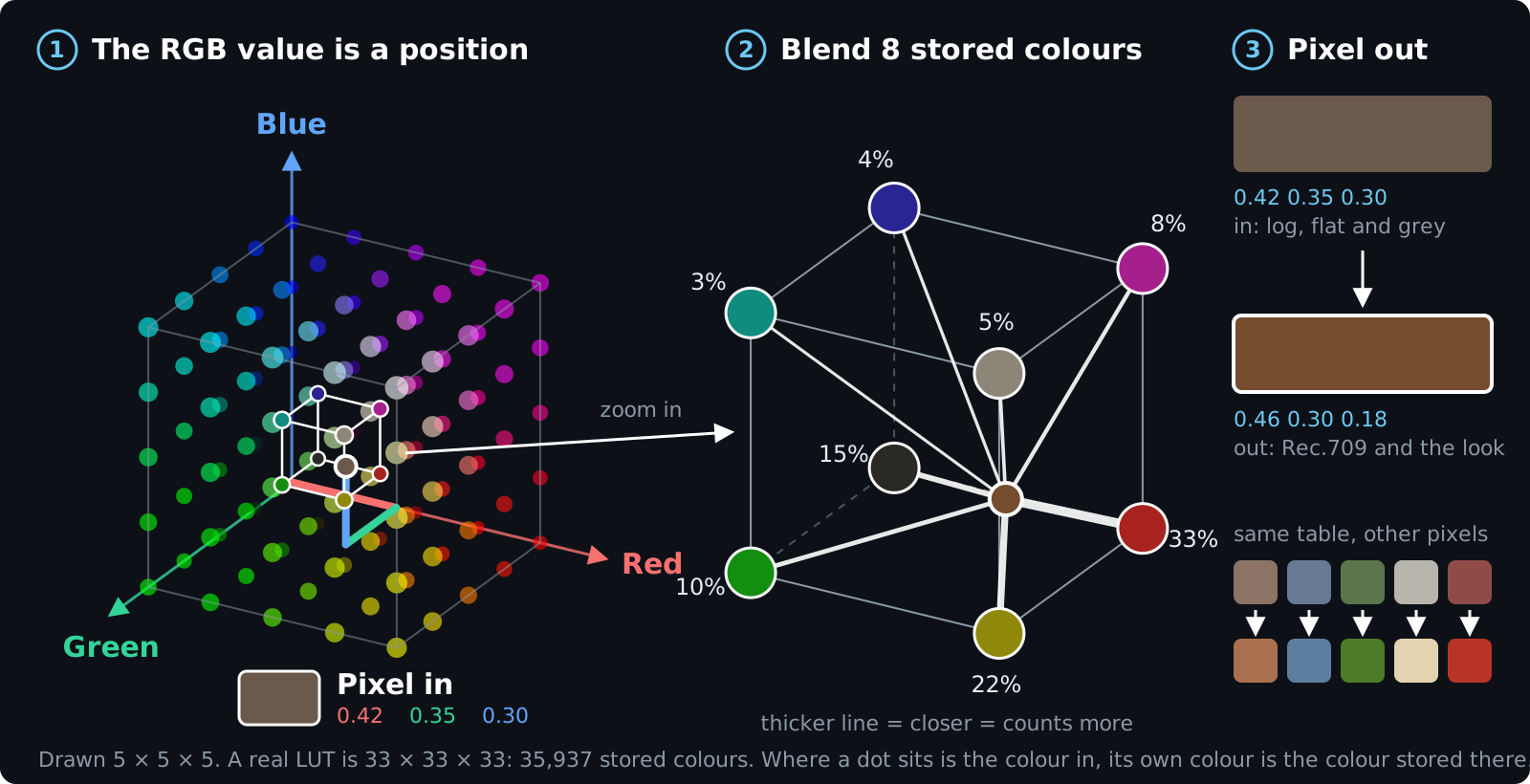
A quick detour on what we actually send to those boxes, since the rest of the post is about building it fast.
Take every color a pixel can have and lay it out in space: red on one axis, green on another, blue on the third. Black sits where the axes meet, white in the far corner. A flat grey log pixel from the camera might be 0.42 red, 0.35 green, 0.30 blue. Read that way, the three numbers stop being a color and become an address.
A 3D LUT stores a new color at regular points in that cube. At 33 points per axis that’s 35,937 entries. The pixel lands inside a small cell with eight corners; you read the eight stored colors, blend them by distance, and that blend is the output pixel. Skin, sky and grass all go through the same lookup.
There’s no branching and no color science at runtime. The Rec.709 conversion and the creative look are both baked into the table, which is why a color box can do this for two million pixels fifty times a second. It also means changing the look is always the same job: build a new table and get it to the box.
Three problems at once
First, fan-out: thirty or more color boxes, each with its own chain, each needing a fresh LUT on every slider tick. Second, the interface: node graphs, GPU scopes, color wheels and curves are a long way from forms. Third, we weren’t going to rewrite the dashboard, with its 73 camera controls, MQTT plumbing and camera state.
A single-scheduler ARM board was never going to run node graphs, GPU scopes and thirty LUTs per tick.
So we tried a spike: a desktop app with the same Elixir app inside.
Act three: a desktop spike with Tauri and Burrito
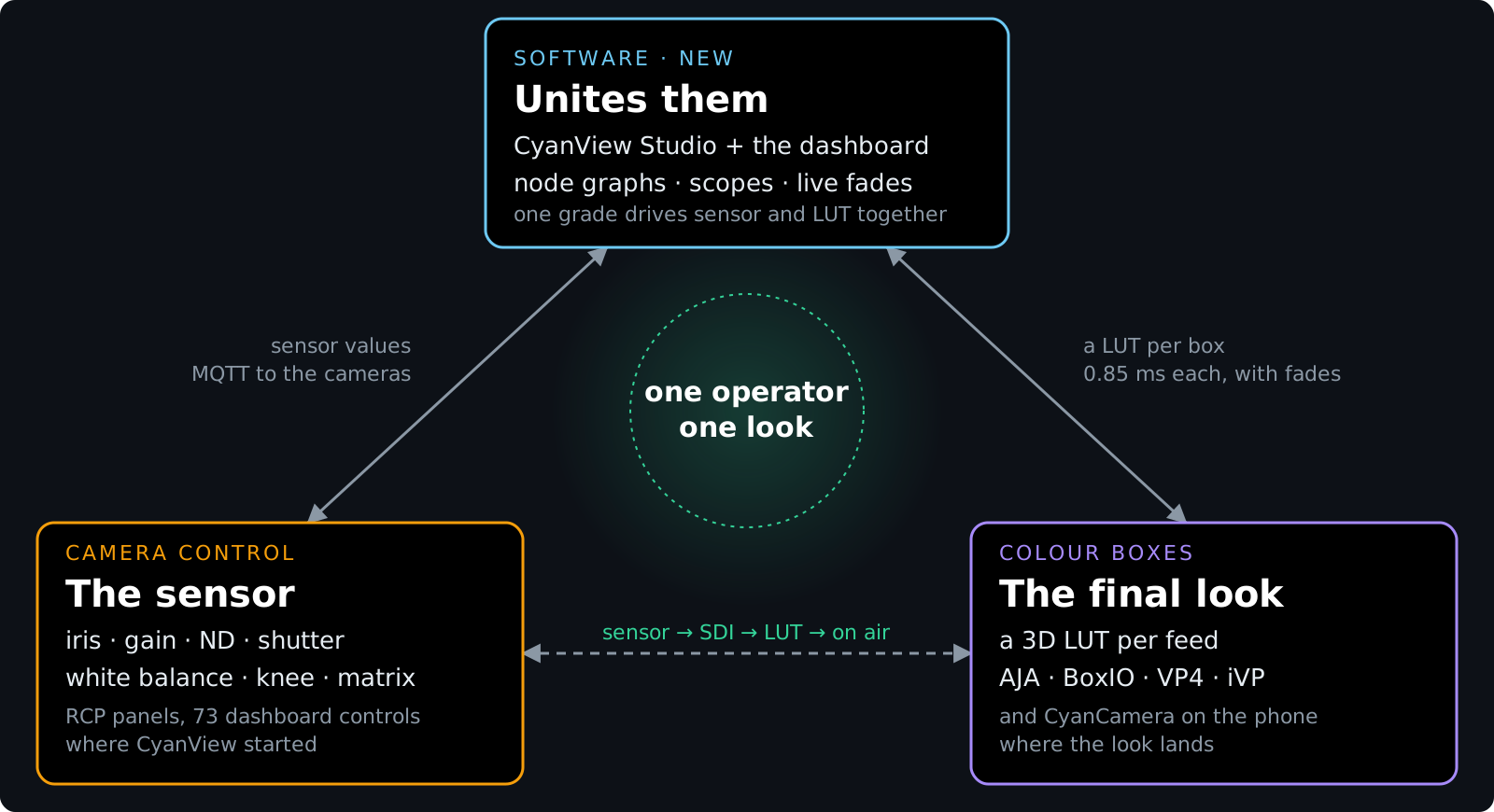
Left side is camera control, where CyanView started. Right side is the color boxes, one LUT per feed. The middle is what the studio adds: one grade that drives both.
Tauri and Burrito
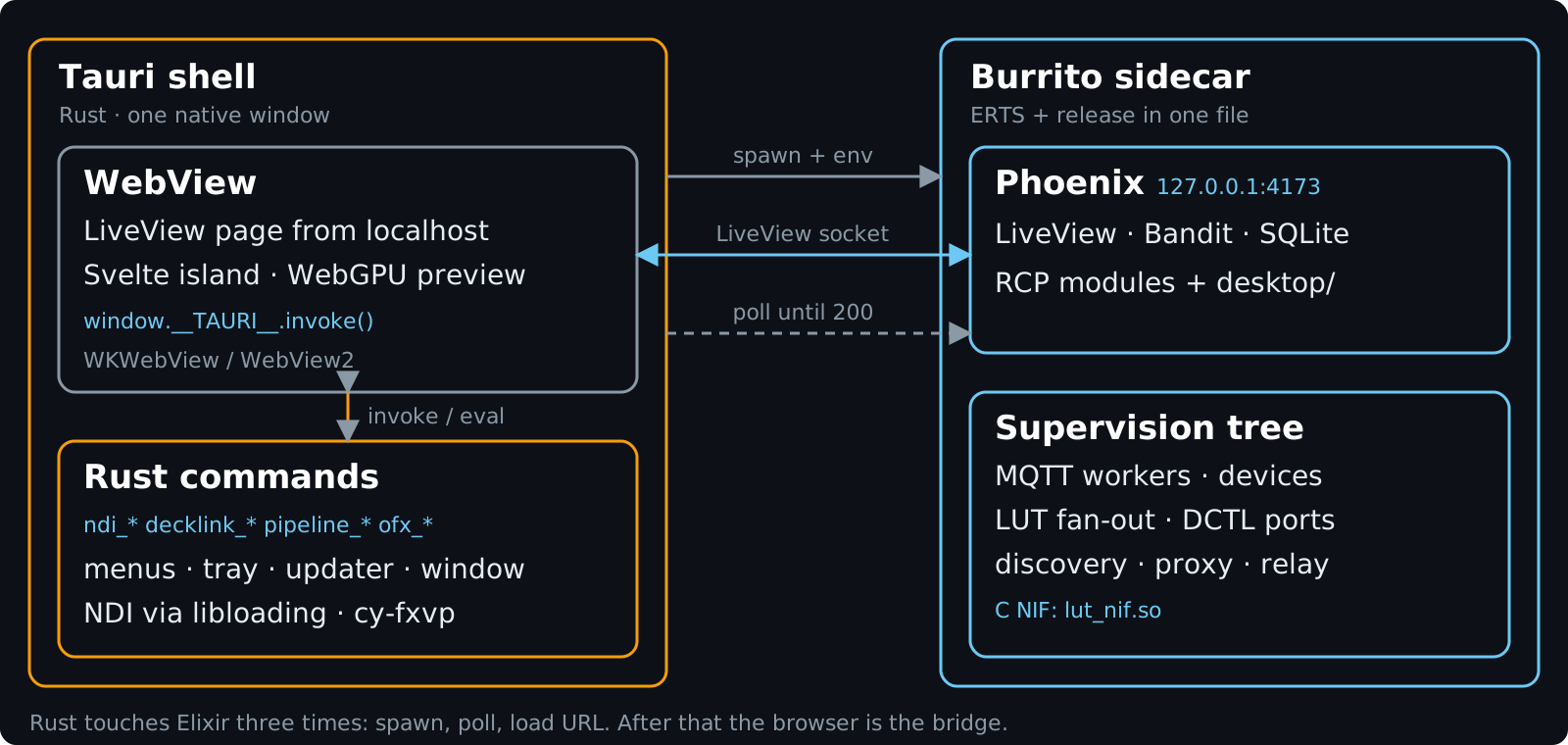
The shell is Tauri: Rust, a native window, menus, updater and tray icon. Burrito packs ERTS and our release into one binary per platform. The step-by-step is in Elixir LiveView Single Binary, so I’ll only sketch it here.
Tauri launches that binary as a sidecar with a target and a port, polls localhost until Phoenix answers, and then points the webview at the LiveView.
handle.shell()
    .sidecar("cy_camera_companion_backend")?
    .env("CY_COMPANION_PORT", "4173")
    .env("BURRITO_TARGET", "tauri")
It polls http://127.0.0.1:4173 once a second, up to 180 times, and then opens the webview on /desktop. Backend stdout goes to backend.log since the sidecar has no console on Windows. That’s the whole Rust-to-Elixir integration.
Three minutes sounds like a lot, but the first launch on Windows unpacks the entire release while Defender scans every file.
The spike worked. Users see one app, and underneath it’s the same RCP engine.
Mix targets
The desktop build isn’t a fork, it’s a Mix target. By default we compile the RCP modules, and one variable pulls the desktop directory in.
defp elixirc_paths(_env, :desktop), do: ["lib"]
defp elixirc_paths(_env, _target),
  do: ["lib/cy_camera_companion", "lib/cy_camera_companion_web", ...]
The supervision tree doesn’t check a config flag. Each desktop child is guarded by “is this module loaded?”, so whatever wasn’t compiled in never starts.
# {gate, child_spec}: start only if the module was compiled in
{Desktop.Services.MqttWorkerSupervisor, Desktop.Services.MqttWorkerSupervisor},
{nil, {Registry, keys: :unique, name: Desktop.Discovery.Registry}},
...
|> Enum.flat_map(fn {mod, spec} ->
  if Code.ensure_loaded?(mod), do: List.wrap(spec), else: []
end)
The dashboard comes along
scope "/", CyCameraCompanionWeb do
  live "/", HomeLive                                   # the RCP dashboard
  live "/scene/:scene_id/camera/:camera_id", CameraControlLive
end

scope "/desktop", CyCameraCompanionWeb do
  live "/projects/:project_id", StudioLive             # the new studio
  live "/projects/:project_id/feeds/:feed_id/scopes", ScopesFullscreenLive
end
Router, endpoint, MQTT workers and camera state are all shared. The studio doesn’t import the dashboard, it just lives beside it in the same app. We solved “reuse the dashboard” by leaving it where it was.
Act four: then we kept adding neighbors
Once the spike worked, we handled every hard problem the same way: find the right tool for it, run it next to Elixir, and keep the decisions in Elixir.
| Problem | Neighbor | Mechanism |
|---|---|---|
| LUTs to 30+ boxes, 0.85 ms each at 33³ | C | dirty NIF + Task.async_stream |
| Looks change on air without a jump | C + OTP | a lerp NIF + one fader GenServer |
| Colorists think in node graphs | Svelte | one island inside LiveView |
| Scopes on the live grade | WebGPU | WGSL compute in the webview |
| Users bring their own shaders | C++ | compiled at runtime, run as a Port |
| Live video effects at 1080p60 | C++ and Metal | our own OpenFX host, in the Rust shell |
| Three operating systems from one Mac | Zig and Rust | cross-compiled NIF inside Burrito |
WebGPU scopes
The colorist has to see what the grade does to the signal while dragging. That’s millions of pixels per frame, so they never go near the server. The server does the maths and pushes the LUT, and the browser handles the pixels.
| Scope | WebGPU pipeline |
|---|---|
| Histogram | compute: count → compute: build vertices → render |
| Waveform | render into an rgba16float HDR texture, additive blend → tonemap |
| Parade | same HDR path, per channel |
| Vectorscope | same HDR path, chroma plane |
| Preview | the server’s LUT as a 3D texture, applied in WGSL |
Scopes can also open fullscreen in their own window, which is just another route. I covered the WebGL version in the scopes post. With WebGPU we got compute shaders, so histogram counting moved off the CPU as well.
Svelte for the node editor
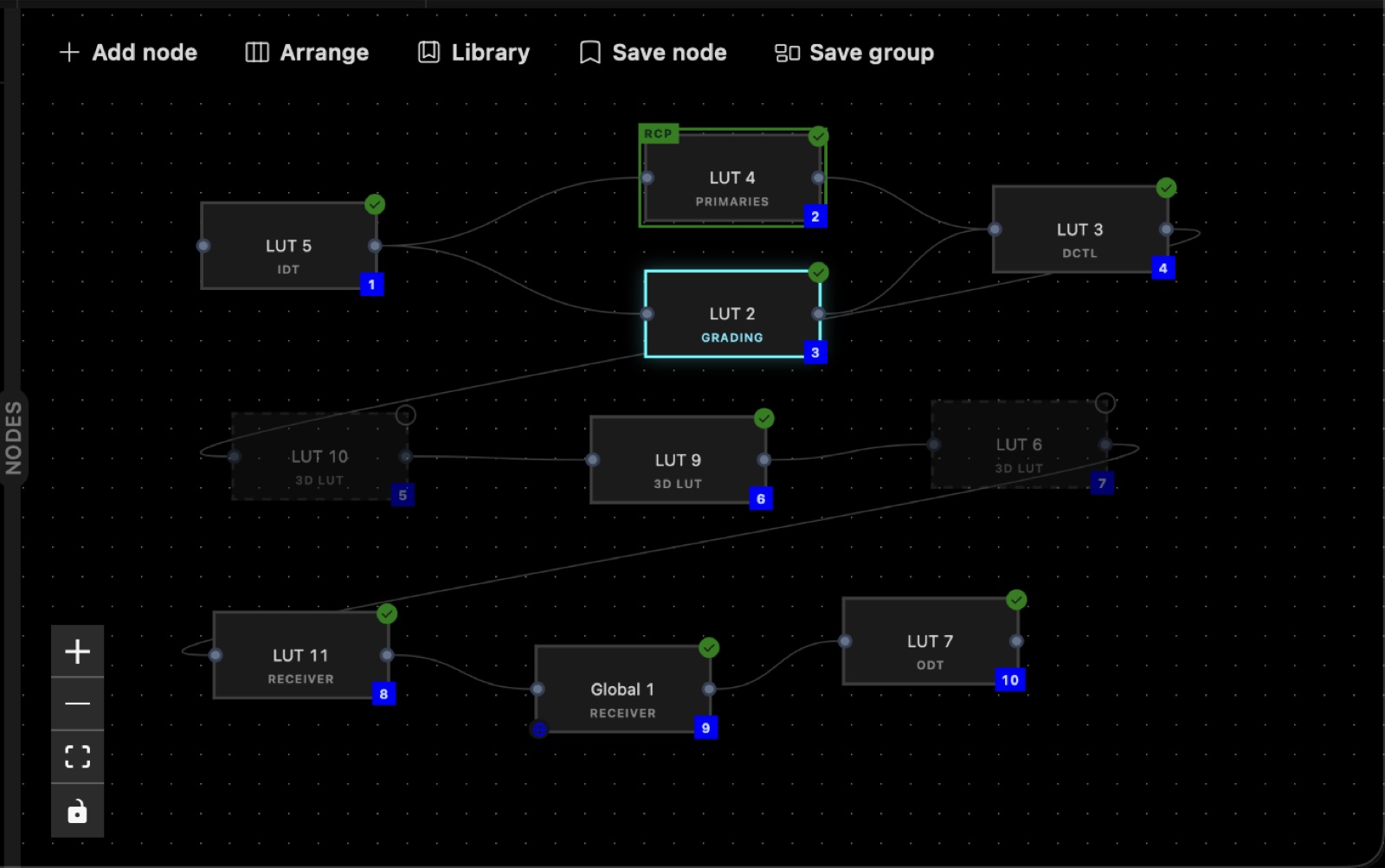
Problem two. A grade is a chain (input transform → grading → DCTL → cube file → output transform), plus groups of those, linked or copied. Colorists want to drag boxes around, not fill in forms, and LiveView on its own isn’t great at drag-and-drop graph editors.
So there’s exactly one Svelte component in the app. It takes nodes and edges as props and pushes nine events back.
<.svelte name="LutFlow" id="LutFlow"
  props={%{nodes: @nodes, edges: @edges, chainIds: @chain_ids,
           selectedNodeId: @selected_node_id, rcpActive: @rcp_active}}
  ssr={false} class="absolute inset-0" />
// LutFlow.svelte
props.live.pushEvent("edge_added", {id, source, target})
def handle_event("edge_added", %{"source" => s, "target" => t}, socket) do
  # re-validate: one root only, no cycles; then save (200 ms debounce),
  # regenerate preview LUT (17³, max one per 16 ms), push it to WebGPU
end
The graph is xyflow-shaped JSON everywhere: in SQLite, in assigns, and in xyflow itself, so there’s no translation layer. Elixir does the topological sort and sends the chain order back down as badges.
Things that turned out to matter:
- Fixed component id, so xyflow’s viewport and undo survive grade switches.
- The server re-validates every client edit. The client validates too, for feel.
- Build: mix runs bun, bun runs esbuild, esbuild runs the Svelte compiler. No Node.
LUT fan-out
| The problem | Size |
|---|---|
| One 3D LUT at 33³ | 35,937 RGB triplets, 431 KB of float32 |
| Targets on the network | 30 plus cameras and color boxes |
| Each with its own chain | its own LUT, not a copy |
| Slider events | 60 per second, still moving |
| Target we set | 1 to 2 ms per box |
| Measured, 33³, one target end to end | 0.85 ms |
On the phone this cube only had to run in a shader. Here we have to build it thirty times per slider tick. The operator drags a slider on a laptop, and every camera and color box on the venue network needs a fresh LUT of its own while the slider keeps moving.
Doing that in pure Elixir wasn’t realistic.
The C NIF
This is the only place where C runs inside the VM.
static ErlNifFunc nif_funcs[] = {
  {"generate_mixed_nif", 1, generate_mixed_nif, ERL_NIF_DIRTY_JOB_CPU_BOUND},
  {"lerp_lut_nif",       3, lerp_lut_nif,       0},
  {"encode_u16_le_nif",  1, encode_u16_le_nif,  0},
  ...
};
| LUT generation | Measured |
|---|---|
| Full chain, 17³ / 33³ / 65³ | 0.15 / 0.57 / 3.7 ms |
| First call in a fresh VM | ~3 ms, so we warm it up at mount |
| Color spaces | 42, sRGB to ACES to Apple Log |
| Parallelism | GCD on macOS, OpenMP elsewhere, one row per work item |
The color science (CDL, curves, primaries, color space conversion) is plain C11, built by elixir_make during mix compile. Elixir packs the grade into a single binary with native-endian bitstrings and gets back one binary of size³ × 3 floats, without copying.
It started life as a Port. Then we measured: generation took about a millisecond, and the twenty millisecond debounce in front of it was pure latency. We switched to a NIF and deleted the coordinator.
The cost is that a NIF crash takes down the VM. The comment at the top of the C file says so: “a NIF crash takes down the whole BEAM (the old port crash was isolated). Every NEED() bounds check from the former decoders is preserved, and size is capped before any allocation.” MAX_LUT_SIZE is 129, MAX_CHAIN is 64 nodes. A failed load never fails @on_load; the app runs degraded and says so.
We accepted that for one hot path in code we wrote ourselves. Everywhere else we use Ports, more on that at the end.
How the fan-out runs
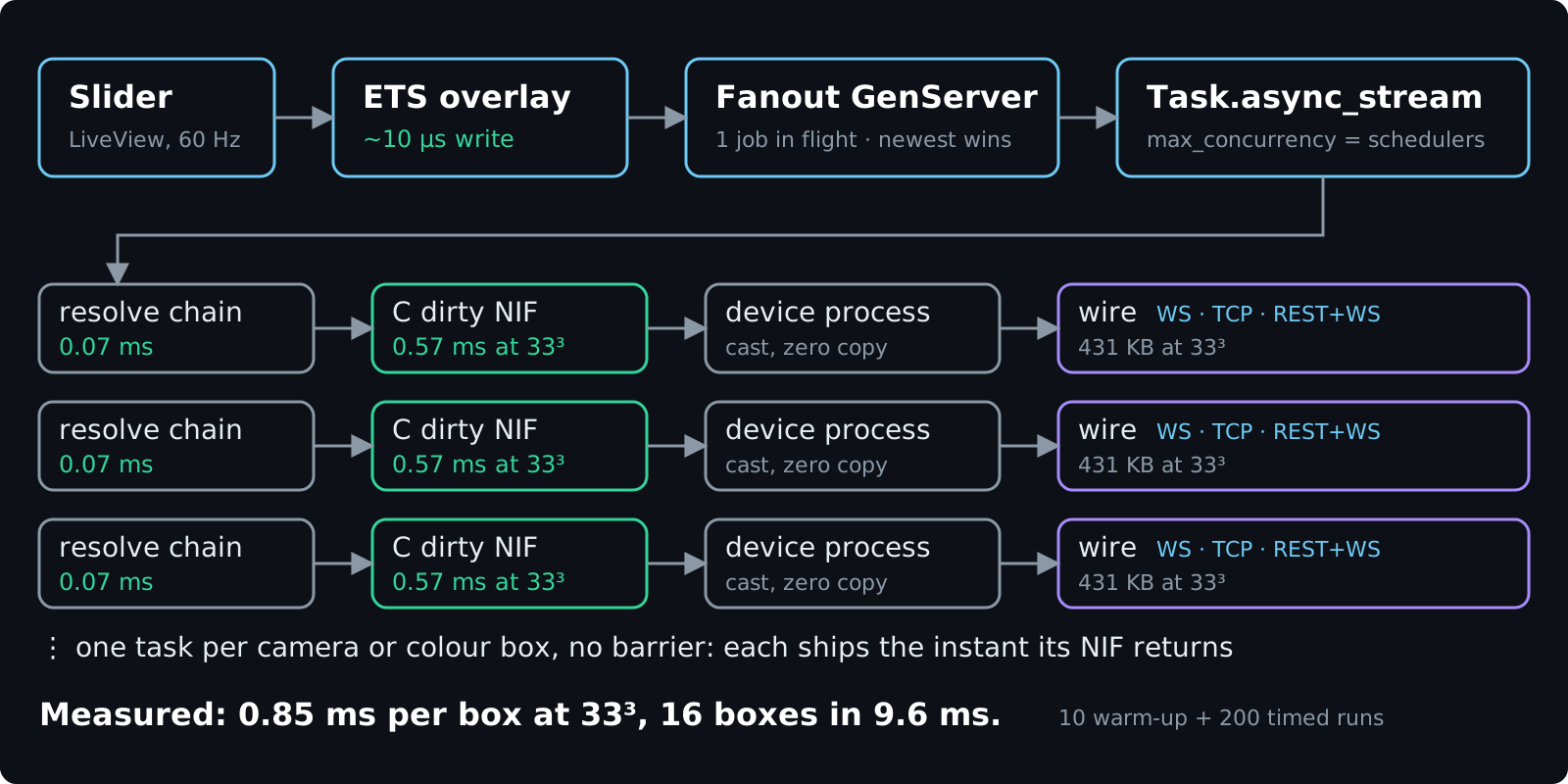
A GenServer keeps one job in flight. A newer request replaces whatever is pending, so a slider drag never queues up and the cameras end on the last value.
Each box gets its own task under Task.async_stream (max_concurrency set to schedulers_online, unordered, killed on timeout). The task resolves the chain, calls the NIF and pushes to the device as soon as the NIF returns. Boxes don’t wait for each other.
Our first try was a batched NIF, one call instead of thirty, which looked faster on paper. In practice every box waited for the slowest LUT, so a DCTL box at 150 ms held up a grading box at 3 ms. GCD nests fine across concurrent NIF calls, so we went back to per-box tasks and let the BEAM schedule them. The revert deleted 120 lines of C and 70 of Elixir.
Measured
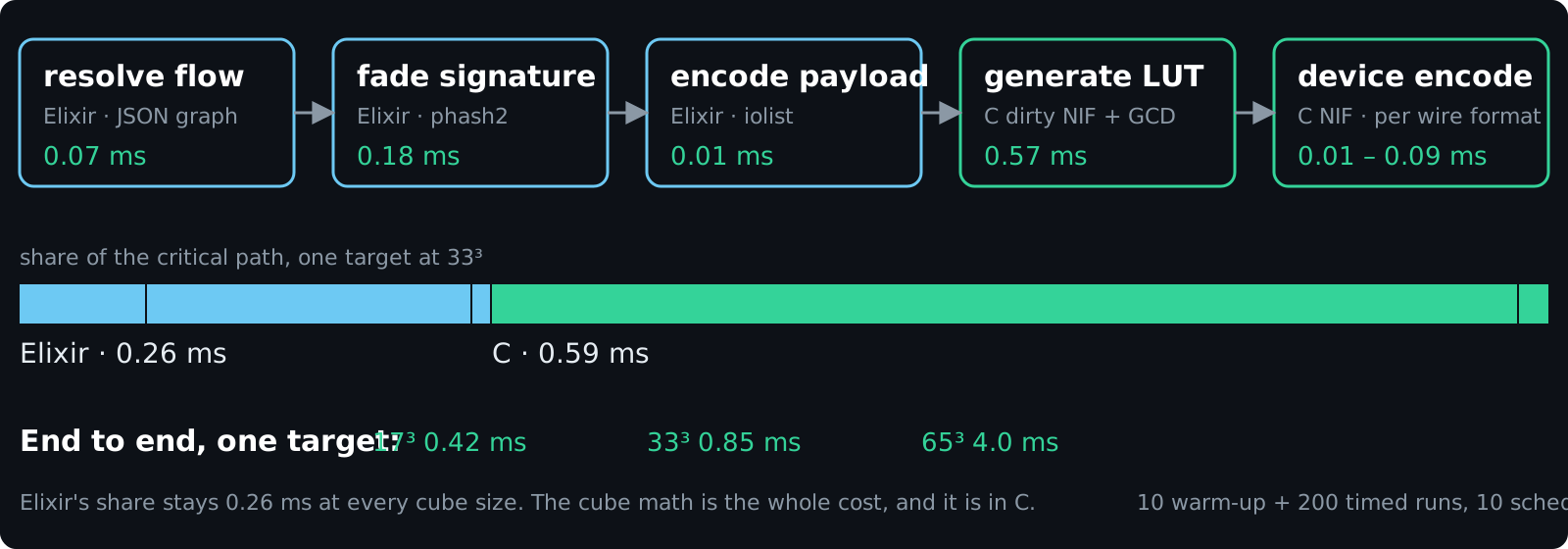
Full chain: IDT S-Log3 → grading → primaries → 3D LUT → ODT Rec.709. 10 warm-up calls, then 200 timed, average in ms, on a Mac with 10 schedulers.
| Fan-out wall time, ms | 1 target | 4 | 8 | 16 |
|---|---|---|---|---|
| 17³ | 0.42 | 1.0 | 1.5 | 2.7 |
| 33³ | 0.85 | 2.6 | 4.7 | 9.6 |
| 65³ | 4.0 | 14.8 | 29.5 | 59.6 |
Wall time grows with targets per scheduler rather than with the raw target count. Elixir’s part of the critical path is about a quarter of a millisecond and stays flat as the cube grows. Device encoders are C NIFs too, at 1 to 9 percent of the generation cost.
The one slow Elixir step, writing a .cube file (5 ms), runs as an async task off the critical path. Our rule of thumb: if it touches every LUT entry on the hot path, it’s C. Per-target bookkeeping and anything off the critical path stays in Elixir.
For a sense of scale, here’s thirty boxes at 60 Hz in raw bytes:
| LUT size | Frame size | 30 cameras @ 60 Hz |
|---|---|---|
| 17 | 78 KB | 141 MB/s |
| 33 | 575 KB | 1,035 MB/s (≈ 1 GB/s) |
| 65 | 4.4 MB | 7,920 MB/s (≈ 8 GB/s) |
Device protocols
| Device | Transport | Payload | Encode at 33³ |
|---|---|---|---|
| CyanCamera, the phone | WebSocket | JSON header + RGBA float32, laid out for Metal | 0.012 ms |
| VP4 | WebSocket /ws/look/{ch} |
16.16 fixed point, u32 big-endian | 0.023 ms |
| AJA ColorBox | REST PUT, then WebSocket :5000 | 4-byte ASCII slot + uint16 LE triplets | 0.018 ms |
| AJA FS-HDR | REST, then WebSocket /luts |
same uint16 LE, exactly 215,622 bytes at 33³ | 0.013 ms |
| Flanders BoxIO | raw TCP, magic 0x42340299 |
12-bit or resampled to the box’s grid, checksummed | 0.094 ms |
| DaVinci Resolve | WebSocket to our WsLut plugin | same 16.16 fixed point, signed | not measured |
There’s a DynamicSupervisor, a process per device and a Registry. The NIF result goes to each device process by cast, and since binaries over 64 bytes are reference counted, thirty casts don’t copy anything.
Six targets share four wire formats: RGBA floats for the phone, 16.16 fixed point for VP4 and Resolve, uint16 for both AJA boxes, and BoxIO’s own framing.
The last column is measured. Until recently two of those encoders were Elixir comprehensions taking about two milliseconds, longer than generating the LUT. Moving them to C made them roughly a hundred times cheaper.
The first row is the phone from the previous post. The LUT in its Metal shader is built here and goes out through the same fan-out as a rack-mounted AJA box.
The live fade
On air a look can’t jump, because every viewer would see the snap. So any LUT push can crossfade, per feed and per device, while the operator keeps dragging.
| Fade | Setting |
|---|---|
| Default | 25 steps over 1 second, up to 199 steps over 60 seconds |
| One step | one lerp NIF call: a × (1 − t) + b × t, 0.010 ms at 33³ |
| Push mid-fade | retargets from the last blend sent, no snap |
| Last step | lands on the target LUT bit-exact |
| Per node type | choose fade or straight, e.g. a receiver goes straight |
def step_fade(%{step: step, frames: frames} = fade) do
  step = step + 1

  with true <- step < frames,
       {:ok, blend} <- LutNif.lerp_lut(fade.from, fade.to, step / frames) do
    {:fading, %{fade | step: step}, blend}
  else
    false -> {:settled, fade.to}          # last step: the exact target, not a blend
    {:error, _} -> {:settled, fade.to}    # a failed blend snaps, never drops
  end
end
It’s one GenServer holding a map of fades keyed by device, with Process.send_after as the clock. Ticks are anchored to the fade start, so time spent blending and sending doesn’t stretch the fade. Each retarget gets a fresh tick ref, which orphans the old timer, so there’s nothing to cancel. A failed send on one device gets rescued and doesn’t stop the other fades.
It’s 174 lines of Elixir and one C function sitting in front of every device send, and all four wire formats got fades from it at once.
OpenFX on live SDI
Next request: OpenFX plugins on the live feed.
| Live video | Number |
|---|---|
| Frame rate | 1080p60 |
| Budget per frame | <16 ms |
| One RGBA frame | 8.3 MB |
| Per second | 415 MB |
None of that should go through a garbage collected VM.
What Rust does
Rust handles menus, the tray, window state and the updater. It loads the NDI SDK at runtime with libloading, runs the DeckLink capture and output threads, and binds the C++ OFX host. It has no business logic, doesn’t touch the database and doesn’t render UI.
It only deals with Elixir at startup (spawn, poll, load the URL). After that the webview is the bridge, with the LiveView socket on one side and Tauri invoke on the other. We never built a direct Rust-to-Elixir channel and haven’t missed it.
FXVP: our OpenFX engine
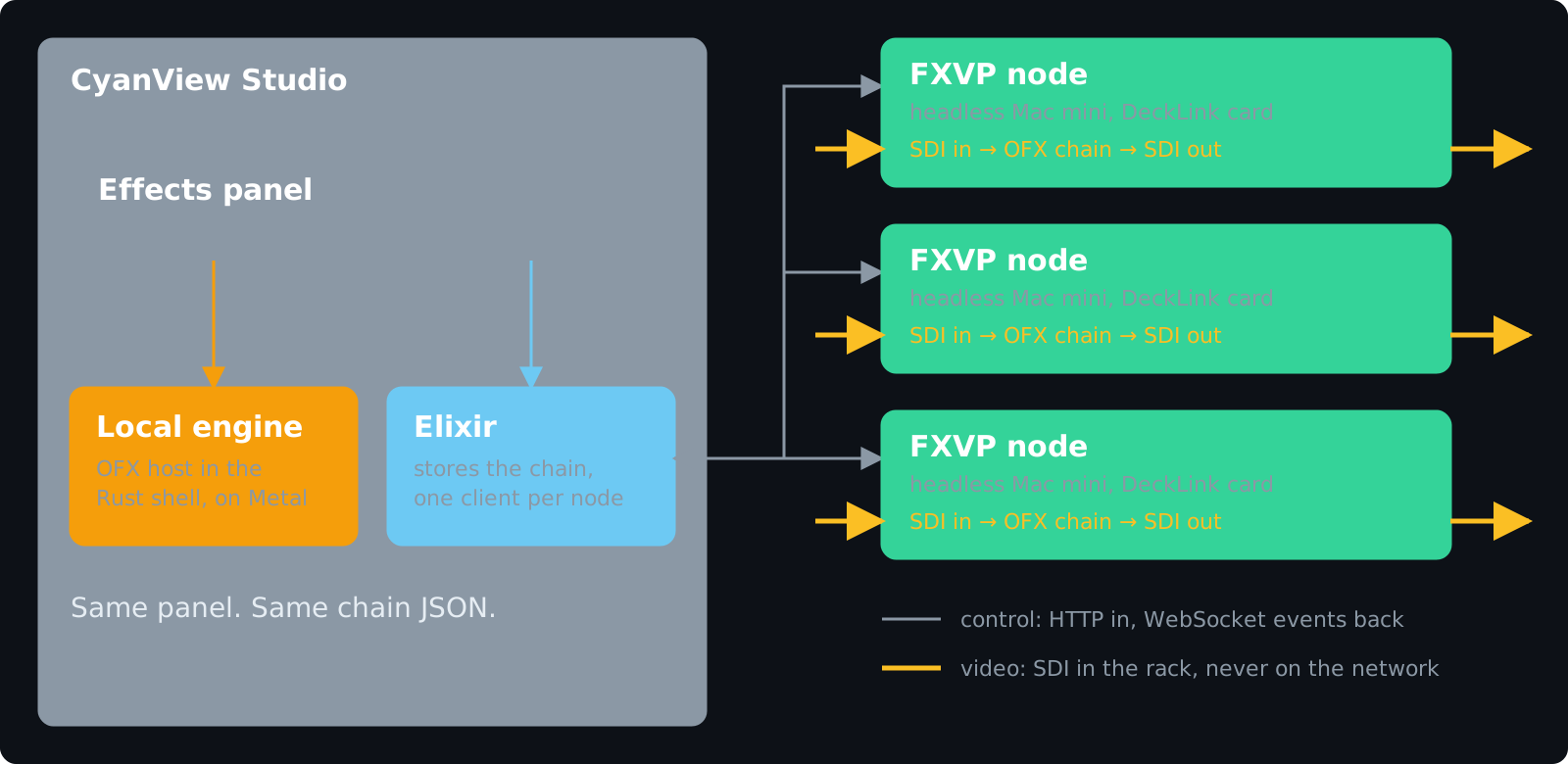
FXVP is the OpenFX engine we wrote for this. The first version runs inside the studio, hosted by the Rust shell, and the panel talks to it through Tauri invoke.
A laptop has one DeckLink and one GPU, though, and a truck has a lot of feeds. So the same engine also ships as a daemon for a headless Mac mini with a DeckLink card. Each daemon runs one pipeline on one port, restores its last pipeline on boot and starts processing before anyone connects.
The operator doesn’t notice the difference. Elixir keeps a client per box, pushes the chain over HTTP and relays the box’s events back to the panel over PubSub. Only the chain definition and a few floats go over the network, never video.
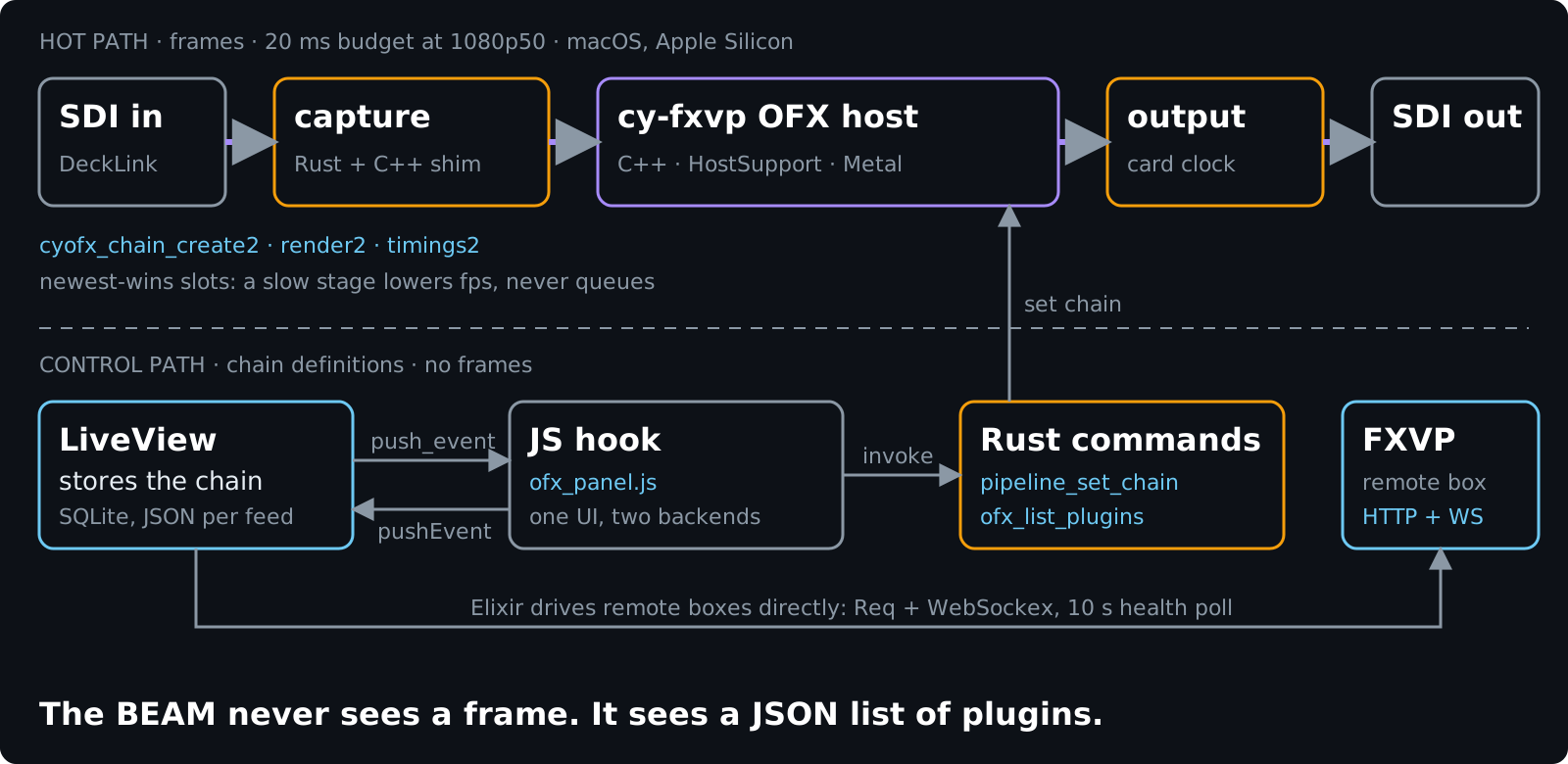
The host is C++ on top of the official HostSupport library, with a zero-copy Metal pipeline on Apple Silicon. Tauri’s build script compiles it with cmake and links it statically. Video goes from DeckLink to Rust to C++ and back out to SDI, and the BEAM never sees a frame.
Cross-compiling from one Mac
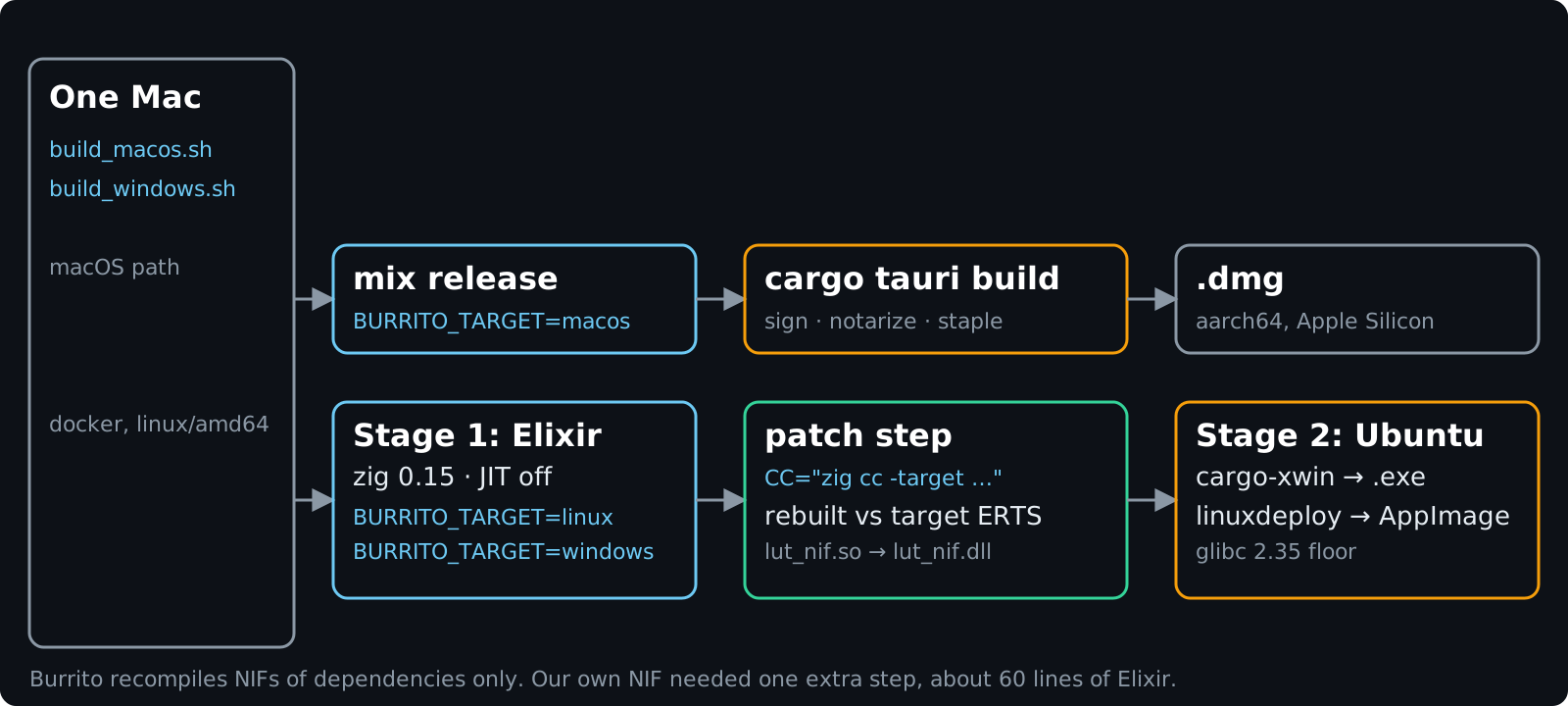
Burrito’s build step only recompiles NIFs in dependencies, not in your own app, so we added one step that rebuilds c_src with zig cc against the target’s ERTS headers.
System.cmd("make", ["all", "--always-make", "PRIV_DIR=#{priv_native}"],
  cd: "c_src",
  env: [
    {"CC", "zig cc -target #{triplet}"},
    {"ERTS_INCLUDE_DIR", erts_include}
  ])

if context.target.os == :windows do
  File.rename!("lut_nif.so", "lut_nif.dll")   # load_nif resolves <path>.dll
end
The catch is that zig doesn’t ship libomp, so cross-built LUT generation runs single-threaded. Windows gets built from Linux with cargo-xwin, and the Linux stage uses Ubuntu 22 for an older glibc. It all runs as one docker build on a Mac.
Auto-update
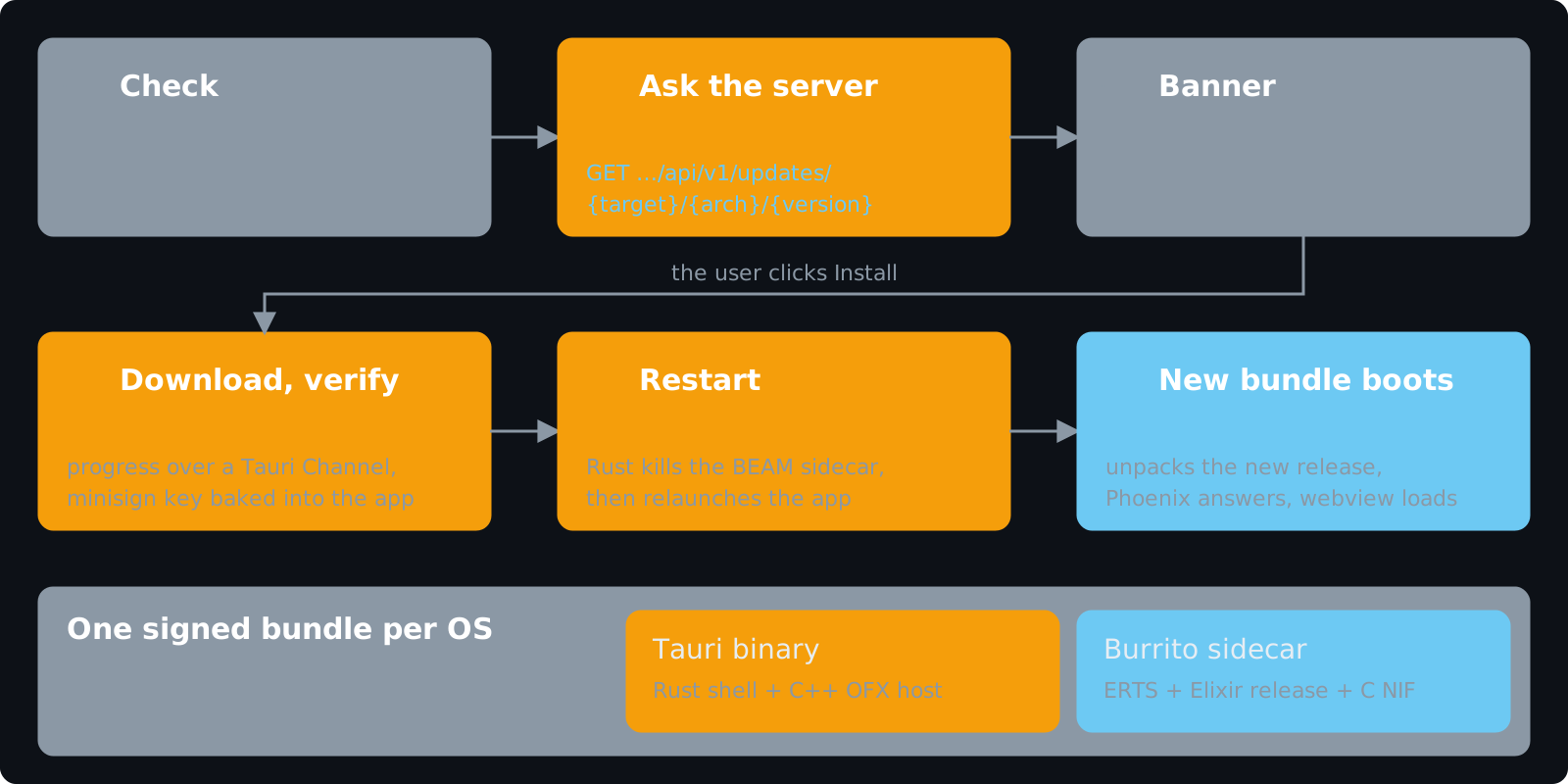
Three seconds after launch the webview asks Tauri’s updater plugin to check. The plugin sends our server the target, architecture and current version, and if there’s something newer it gets back a version, release notes, a download URL and a signature.
The user gets a small banner with “later” and “install”. Install downloads the bundle with a progress bar, and the plugin checks the signature against the minisign public key compiled into the app, so unsigned bundles won’t install.
After that a single Rust command kills the BEAM sidecar and restarts the app. The new bundle boots like a first launch: Burrito unpacks the release, Phoenix comes up on localhost, the webview loads. Shell and sidecar ship in the same bundle, so their versions can’t drift.
Elixir isn’t involved at all. No hot code upgrades, no appup files. The release is just cargo inside a signed bundle, which for a desktop app is all we wanted.
Licensing
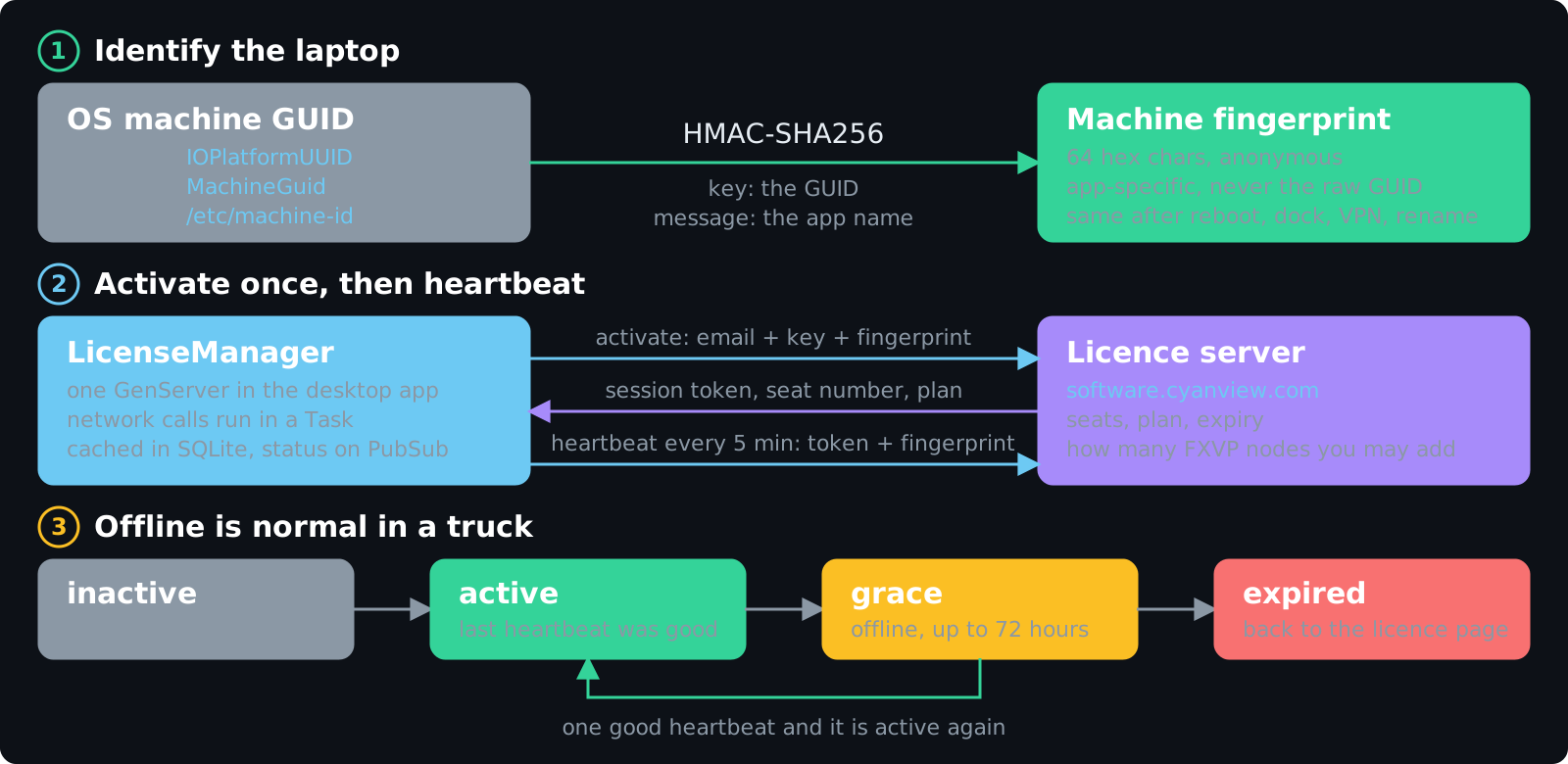
Licences are sold per seat, and a seat is one laptop. Our first attempt used hostname plus MAC address, which changed whenever someone plugged into a dock, joined a VPN or renamed the machine. One laptop ended up eating several seats.
Now we read the machine GUID the OS already keeps (IOPlatformUUID on macOS, MachineGuid in the Windows registry, machine-id on Linux). We don’t send it anywhere. It’s used as the key for an HMAC-SHA256 over the app name, which gives 64 hex characters that are stable for that laptop, useless to any other app, and can’t be turned back into the GUID.
The rest is a GenServer: activate once, heartbeat every five minutes, with the HTTP call in a Task so the UI still gets answers when the network is slow.
And it will be slow, or just gone. A truck in a stadium car park is offline more often than not, so a failed heartbeat doesn’t lock anything. The licence goes into a 72 hour grace period from the last good heartbeat, and the next good one clears it. A revoked seat or deactivated key is different: the server says so and it takes effect right away.
The rule for foreign code
| Where | When | Examples here |
|---|---|---|
| Port | by default: someone else’s code, or anything that can crash | user DCTL shaders, ffmpeg, ffprobe, the C++ compiler |
| NIF | after a measurement, our own code, every input bounds-checked | LUT generation and fades |
| Outside the VM | frames, pixels, shaders | OFX host, DeckLink, NDI, WebGPU scopes |
If you are considering the same path
- The BEAM is a good fit for anything that has to stay up and talk to lots of other devices.
- Wrap other ecosystems instead of rewriting them. Start with Ports and only reach for a NIF after a benchmark says so.
- Keep frames, pixels and shaders out of the VM, and keep the decisions in it.
- Give each device its own process so one broken protocol doesn’t take the others down.
- Use Mix targets instead of forks. We’ve had one codebase the whole time and I’d do it the same way again.